 Bad
Multi-Account Copying
Copy to up to 20 accounts from one master. Add or remove disciples in a few clicks. Market, limit, stop market, stop limit and MIT orders are all supported.
 Trade Disciple — NinjaTrader 8 Trade Copier
Trade Disciple copies your orders from one master account to up to 20 disciple accounts inside NinjaTrader 8. I built it because I run multiple funded accounts myself.
Free for 30 days — then $5.00/month, or $199 once for a lifetime license · Subscription terms
You passed the evals. Now you have a pile of funded accounts and the same order to place on each one. Alt-tab, click, repeat, and by account twelve the market has moved.
Every second spent re-entering an order is a second off the chart. Fills drift. One fat-fingered quantity on the wrong account and that account's drawdown is gone.
Trade Disciple does the repeating. You place the order on your master. It goes to the rest.
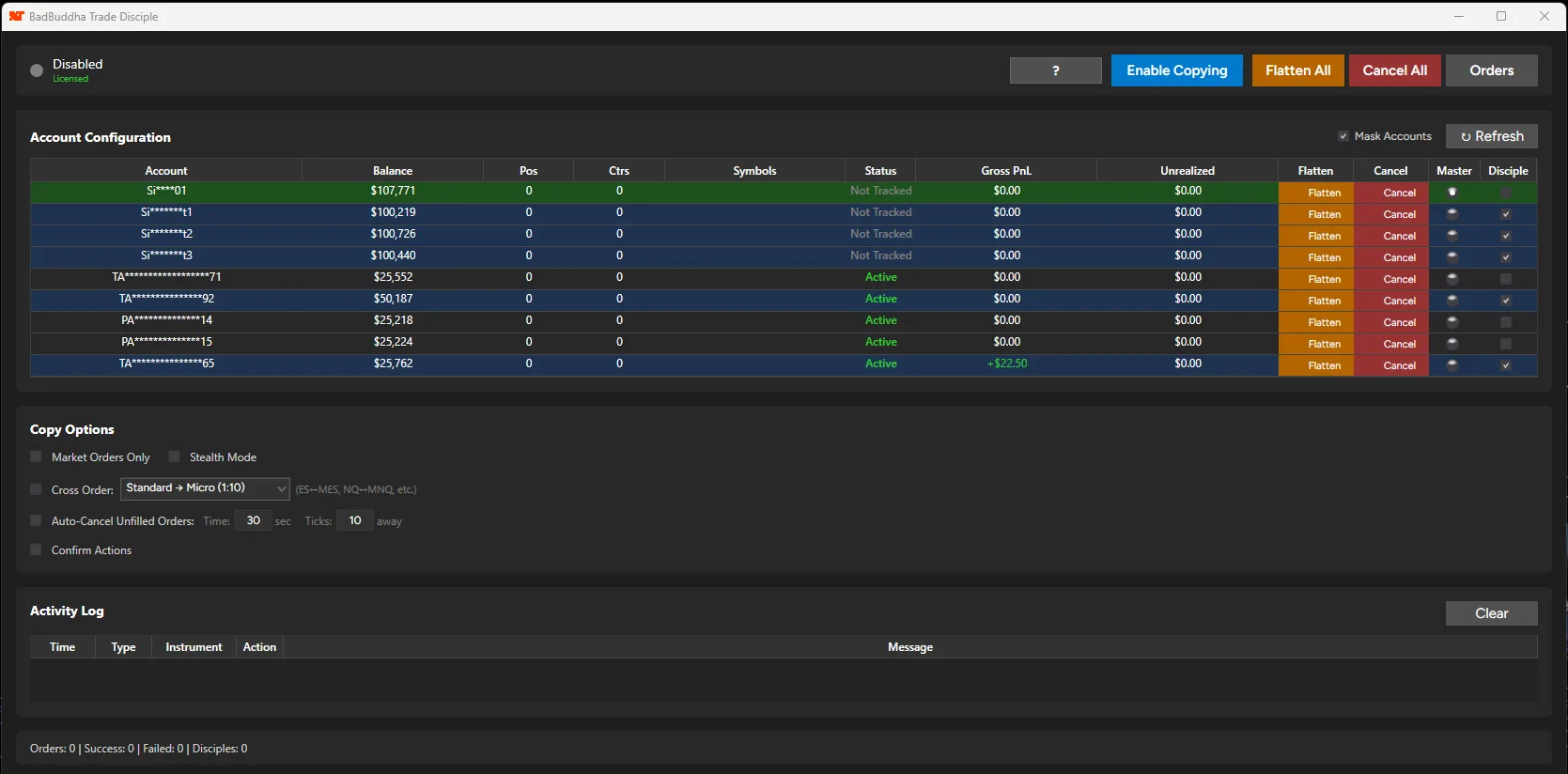
One master, up to twenty disciples — every account, its balance, and its role in one table.
Trade Disciple watches your master account and sends every order to your disciple accounts: market, limit, stop market, stop limit and MIT. Modifications and cancellations follow. Copied orders go out as soon as the master order is seen.
You place a trade once and see every account in the Open Orders Dashboard, so you are not flipping through ten windows to check whether something got missed.
Built for running several funded accounts at once.
Copy to up to 20 accounts from one master. Add or remove disciples in a few clicks. Market, limit, stop market, stop limit and MIT orders are all supported.
Optional. Removes Trade Disciple's label text from copied order names so your order list stays clean. It doesn't change which accounts you copy to. Check your prop firm's copier rules first.
Waits for your master order to fill, then sends market orders to every disciple. No limit orders sitting unfilled on the followers.
Before copying an order, Trade Disciple checks Karma Guardian's lockout status. If an account is locked from a drawdown or loss-limit breach, it gets no orders. No setup needed.
Trade 1 ES on the master and your disciples get 10 MES. It works the other way too. Pairs: ES/MES, NQ/MNQ, YM/MYM, RTY/M2K, CL/MCL, GC/MGC.
Set a time limit or a tick distance. If a disciple order hasn't filled by then, it cancels itself, so stale orders don't sit there while the market runs away.
One window with positions and working orders for every account. Color-coded P&L, one-click flatten, one-click cancel, refreshing every second.
Enter the daily loss limit, max position size and trailing drawdown for each disciple account so those numbers stay on screen while you trade. It is a reference display, not enforcement.
I trade with this, so it has to hold up with real money on the line.
Retry logic: If NinjaTrader rejects an order submission during a connection hiccup, Trade Disciple retries up to 3 times, waiting 50 ms, then 200 ms, then 500 ms between attempts.
Thread-safe: Orders are handled with concurrent collections and atomic state, so several orders at once don't corrupt state or your order history.
Memory: Collections are bounded and cleaned up automatically, so a long session doesn't leak memory.
Logging: Debug logs rotate at 5 MB across 3 backup files. Every submission, fill and error is logged, so you can see what happened.
Start and stop: The service starts and stops cleanly, with no stuck processes when you turn copying off.
Choose the account you trade on. Orders start here.
Pick up to 20 target accounts. Set contract conversion, Stealth Mode and auto-cancel the way you want them.
Trade Disciple watches the master. Orders, modifications and cancellations are copied to every disciple.
What each firm’s own published pages say, with a link to the page and the date I last read it. Check the firm’s current rules before you copy.
| Firm | Copying | What the firm’s page says | Source |
|---|---|---|---|
| MyFundedFutures | Allowed | Copy trading is allowed across all account types, including with external copiers. Copying trades between different traders is not permitted. You are responsible for your copier, and the firm does not support copier problems. | Copy trading at MyFundedFutures Page dated Aug 24, 2026. Read October 3, 2026. |
| Lucid Trading | Allowed | Trade copiers and automated trading systems are permitted. All automated activity must follow Lucid’s rules, and you are responsible for software errors or unintended outcomes. | Other activities Page dated Aug 26, 2026. Read October 3, 2026. |
| Boxcar Trading | Own accounts | You may copy trades across your own Boxcar accounts, using built-in or third-party copiers. Each account still follows its own drawdown, daily loss, position-size, session and news rules, and household account limits apply. | Automated strategies and copy trading Page dated Sep 17, 2026. Read October 3, 2026. |
| TakeProfitTrader | Approved list | TakeProfitTrader’s Trade Copier Policy permits copiers solely for managing accounts you own and control, and bars using them to coordinate activity between different users, identities or accounts. It lists approved copiers: Tradesyncer, TradeCopia, Affordable Indicators, Replikanto Flowbot (Compliance Edition only) and platform-native copier tools such as Tradovate, NinjaTrader, MotiveWave and Quantower. It says unapproved copiers, modified versions or copier-based services may result in enforcement. Trade Disciple is not named on that list today. I am pursuing approval with TakeProfitTrader, and I will update this row if that changes. Until then, ask TakeProfitTrader before using it on its accounts. | Trade Copier Policy Page shows “Updated 7 months ago” as of October 2026. Read October 3, 2026. |
| Tradeify | Only as allowed | Tradeify’s Risk & Compliance FAQ says automated trading is permitted only as expressly allowed, that you remain fully responsible, and that no trading technology exempts you from any Tradeify rule. It lists unowned bots or strategies and coordinated automation across unrelated accounts as grounds for review. Its Funded Trader Agreement also prohibits copying or mirroring trades between you and any other person. Check Tradeify’s copy-trading help article for what is expressly allowed across your own accounts. | Risk & Compliance Guidelines FAQ No page date shown. Funded Trader Agreement Page dated May 2026. Read October 3, 2026. |
| Apex Trader Funding | Own accounts | Apex allows copying across accounts you own. What it forbids is “trade copying with other traders”, meaning group trading from a mix of different people’s accounts, along with sharing accounts, computers or IP addresses. Hedging of any kind is banned too, including long and short positions on the same or correlated instruments at once. Its Prohibited Activities page also says no automation or algorithm usage is allowed, because rewards are meant for human traders, and points to the user agreement for details. I could not find an Apex page that names copier software for your own accounts, so confirm your exact setup with Apex before using any copier. | Apex: Prohibited Activities Page text read by the site owner; no page date seen. Read October 4, 2026. |
Policies change and can differ by account type or plan, and this is a summary of what each firm published as of the date shown on its row, not legal or compliance advice. Trade Disciple is not endorsed or approved by any firm listed. Whether copying is allowed is the firm’s decision, not the copier’s. See also how Trade Disciple compares with other NinjaTrader 8 copiers.
Trade Disciple is a BadBuddha Customs LLC product, built by one trader who runs multiple accounts. Cross Order exists because I trade ES but run micro accounts. Stealth Mode exists because some traders prefer a clean order list. Auto-Cancel came from watching unfilled limit orders sit on disciple accounts while the market ran away.
It is the tool I use. I built it so my attention goes to the market, not to account management.
New to trade copiers? Start with my guide: how to choose a trade copier for prop-firm accounts. Weighing alternatives? See all four copiers compared, or Trade Disciple vs Replikanto, vs the Apex Trade Copier and vs CrossTrade. All guides and comparisons are in one place.
It runs on any account connected to NinjaTrader 8, including prop firm evaluation and funded accounts. Whether your firm allows copiers is a separate question, so check the firm's rules; the policy table on the Trade Disciple page summarizes six firms. Pair it with Karma Guardian if you want lockouts on each account.
It depends on the firm. Some allow copiers across accounts you own, some limit them, and TakeProfitTrader only allows copiers on its approved list, which doesn't name Trade Disciple today. Check your firm's rules before you copy. The policy table on the Trade Disciple page summarizes six firms. Stealth Mode only removes Trade Disciple's label text from copied order names. It doesn't make copying okay where your firm doesn't allow it.
Yes. Cross Order works in both directions. Trade 1 ES on your master and your disciples receive 10 MES automatically. Works with ES/MES, NQ/MNQ, YM/MYM, RTY/M2K, CL/MCL, and GC/MGC.
Trade Disciple retries a failed submission up to 3 times, waiting longer between each try (50 ms, 200 ms, 500 ms). If NinjaTrader rejects the order again after that, check the log.
Yes. Modifications and cancellations on the master are copied to every disciple. Change a price or quantity and the disciples follow. Cancel and they cancel too.
Up to 20 disciple accounts from a single master account. Add or remove disciples in a few clicks.
Yes. Trade Disciple checks Karma Guardian's lockout status before copying any order. If an account is locked, it gets no orders. There is nothing to configure.
Turn on Market Orders Only. Trade Disciple waits for your master order to fill, then sends market orders to every disciple, so they get in when you do.
Trade Disciple is licensed to your NinjaTrader account, not to a computer. If you sign in to NinjaTrader with the same account on your desktop and your laptop, both are covered by one license. After you buy, email your NinjaTrader User ID to activate it.
Trade Disciple is $5/month flat. That covers all 20 disciple accounts, every update and support, and it doesn't cost more as you add accounts. The first 30 days are free and the trial doesn't need payment details. If you'd rather pay once, a lifetime license is $199 (a launch price) and includes all future updates and support.
Place it once. Every account gets it. Try it free for 30 days.
Free for 30 days — then $5.00/month, or $199 once for a lifetime license · Subscription terms