 Bad
Bad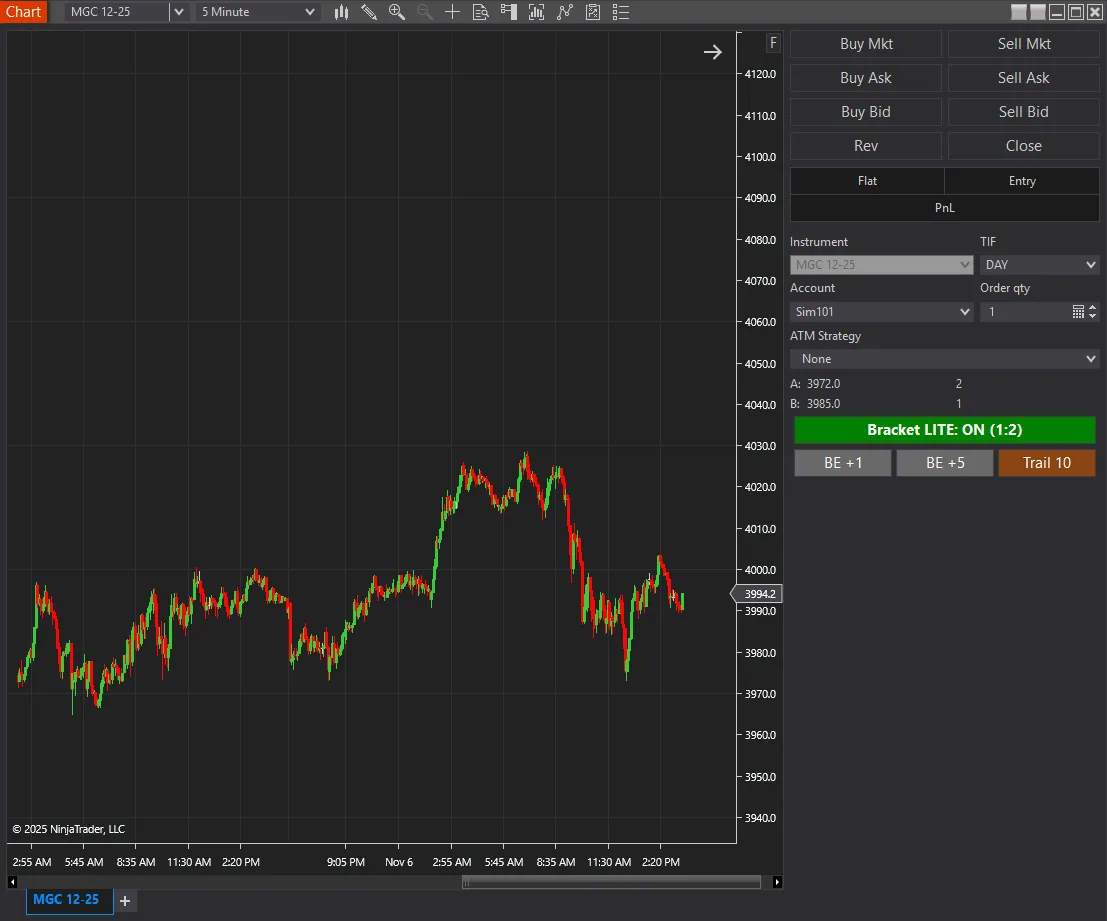
Drag Drop Bracket Manager Lite
FREE
Need the full feature set? Upgrade to Drag Drop Bracket Manager PRO — $279
Version 2.7.0.0 · Free tool — no signup required. See the install guide to get it on your chart.
The Drag-Drop Bracket Manager LITE places NinjaTrader 8 bracket orders by dragging on the chart, at a fixed 1:2 risk-reward ratio, with nothing to configure.
Who Drag-Drop Bracket Manager Lite is for
- Traders new to bracket orders
- Anyone wanting simple, consistent risk management
- Testing the drag-and-drop workflow before upgrading to PRO
Key features
- ✅ Fixed 1:2 R:R Ratio - Consistent, balanced risk management
- ✅ Drag Direction Logic - DOWN for SL, UP for TP (or vice versa)
- ✅ Visual Preview - Yellow line shows your drag level
- ✅ Simple Toggle - One button, no configuration needed
- ✅ User-Based License - Works on unlimited machines
- ✅ Auto-disable - Turns off after placing orders for safety
Install in Under a Minute
Same NinjaScript import as every NinjaTrader 8 add-on.
Download the .zip
Hit the download button above — no account or checkout for free tools.
Import into NinjaTrader 8
Control Center → Tools → Import → NinjaScript Add-On, then select the downloaded file. Don’t unzip it first.
Add it to a chart
Open a chart → right-click → Indicators (or the relevant menu) → add Drag Drop Bracket Manager Lite and configure it to taste.
Stay current
BadBuddha tools include an update checker that tells you inside NinjaTrader when a new version ships — and this page always serves the latest build.
Lite vs PRO
Both place brackets by dragging on the chart. Lite runs a fixed 1:2 ratio with nothing to configure; PRO adds selectable ratios, hotkeys, position scaling and trade management.
| Feature | Drag Drop Bracket Manager Lite Free | Drag Drop Bracket Manager PRO $279 |
|---|---|---|
| Price | Free | $279 one-time |
| Drag-and-drop bracket placement | Yes | Yes |
| Risk-reward ratios | Fixed 1:2 | Five built-in presets — 1:1, 1:2, 1:3, 1:4, 2:1 — plus saved custom ratios |
| Preview while dragging | Yellow line at your drag level | Yellow line plus a live overlay of exact SL/TP prices and distances |
| Hotkeys | — | Ctrl+Shift+B to toggle, Ctrl+Shift+R to cycle ratios |
| Position scaling | — | Four bracket sets, with a configurable percentage at 1:1, 1:2, 1:3 and 1:4 |
| Breakeven and trailing stops | — | Configurable offsets and trailing amounts |
| Sound alerts | — | Success, error and ratio-change confirmations |
| Configuration | One button, nothing to set up | Full settings window |
Drag Drop Bracket Manager Lite FAQ
Is Drag Drop Bracket Manager Lite really free?
Yes — it's a free BadBuddha tool. No trial clock, no account, no activation; download it and use it.
How do I install Drag Drop Bracket Manager Lite?
Download the .zip, then in NinjaTrader 8 go to Control Center → Tools → Import → NinjaScript Add-On and select the file (don’t unzip it first). Full walkthrough in our Getting Started guide.
What does Drag-Drop Bracket Manager PRO add over LITE?
LITE places brackets at a fixed 1:2 risk-reward ratio from a single toggle with no configuration. PRO adds five built-in ratio presets (1:1, 1:2, 1:3, 1:4 and 2:1) plus custom ratios you can name and save, hotkeys for speed (Ctrl+Shift+B to toggle, Ctrl+Shift+R to cycle ratios), a real-time overlay showing exact stop-loss and take-profit prices and distances while you drag, position scaling across four bracket sets with the percentage at each of 1:1, 1:2, 1:3 and 1:4 configurable, breakeven offsets and trailing-stop amounts, sound alerts, and a full settings window.
How does drag-and-drop bracket placement work?
You click the toggle button in Chart Trader, drag on the chart to set either your stop loss or your take profit, and release. The tool calculates the opposite level from the risk-reward ratio — fixed at 1:2 in LITE — and a yellow preview line shows the exact price before you commit. LITE also auto-disables after placing orders as a safety measure.
Does it work on prop-firm evaluation and funded accounts?
Yes. BadBuddha tools run locally inside your NinjaTrader 8 platform and work the same on sim, evaluation, and funded accounts regardless of broker or prop firm.
How do updates work?
Every BadBuddha tool ships with a built-in update checker — when a new version is released, NinjaTrader lets you know, and the download on this page always serves the current build.
Where do I get support?
Email info@badbuddhacustoms.com with "Drag Drop Bracket Manager Lite" in the subject line. Questions, bug reports, and feature ideas are all welcome.
Before you buy
Vendor-neutral guides covering what this tool is for — useful whether or not you buy it.
- How to choose a NinjaTrader 8 risk-management add-on
Monitoring versus enforcement, the six capabilities worth comparing, and the red flags.