Guide

How to Choose a NinjaTrader 8 Risk Management Add-On

The short answer: decide whether you need monitoring (see the risk), enforcement (stop the breach), or both — then demand native NT8 integration, per-account rules, a violation log, and an unlock process you can't tilt your way through.

Monitoring vs. enforcement — decide which problem you have

Risk tools split into two jobs. Monitoring answers "where do I stand right now?" — live equity, drawdown buffer, and P&L across every account, with alerts as you approach a limit. Enforcement answers "what happens when I get there?" — positions flattened, new entries blocked, session over.

If your failures come from not knowing your numbers across multiple accounts, start with monitoring (Karma Guardian). If your failures come from knowing the numbers and trading anyway, you need enforcement (Discipline Master). Most prop-firm traders eventually run both: monitoring for awareness, enforcement as the backstop.

What NinjaTrader's own risk settings cover

NinjaTrader publishes risk settings for prop-firm accounts. Here is what its page lists, next to the two BadBuddha tools.

NinjaTrader's published prop-firm risk settings compared with Karma Guardian and Discipline Master
Rule NinjaTrader's risk settings Karma Guardian Discipline Master
Daily loss limit Yes. Reaching it locks the account, and no new orders can be placed until the next session. Yes, as a percentage with a warning level. Reaching it locks the account and blocks new orders. Yes. Flattens open positions and blocks new entries for the rest of the session.
Weekly loss limit Yes. No. No.
Trailing max drawdown Yes, end-of-day or real-time. Yes, as a drawdown percentage lockout with a warning level. Not a rule type.
Profit target Daily and weekly. Reaching one locks the account from new trades. Daily profit target only. No.
Max trades per day Not listed on the page. Yes. Yes.
Consecutive losses Not listed on the page. Yes. No.
Trading-hours window Not listed on the page. No. Yes.
Closes open positions Not stated. The page only describes blocking new orders. Not automatically. A lockout blocks new orders only. Yes.
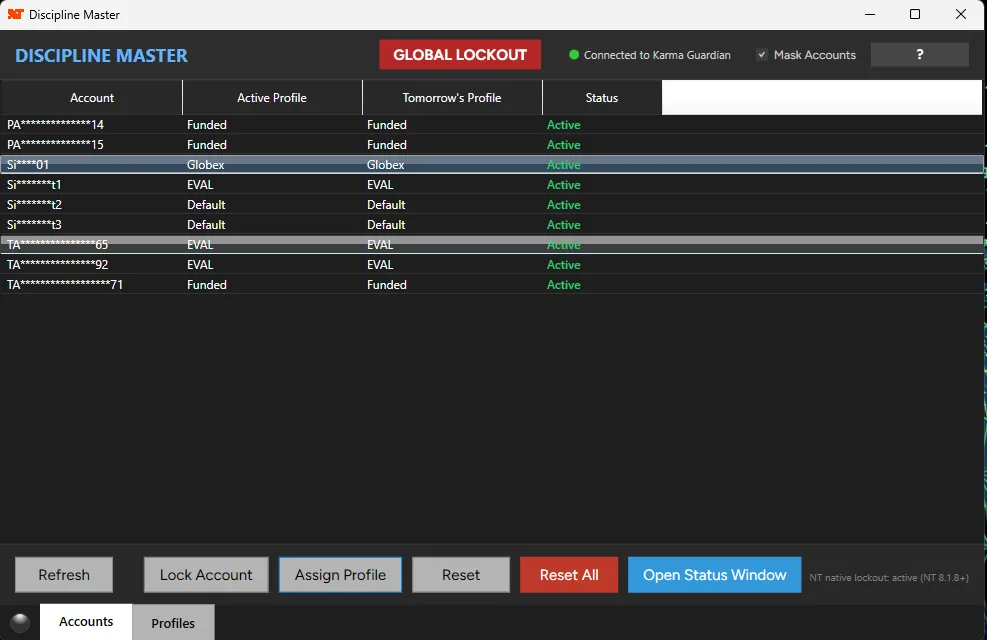
Several accounts at once The page calls the settings account-level and does not describe multi-account control. Yes. Every connected account in one window. Yes. Global Lockout locks every account it watches in one click.

The NinjaTrader column comes only from its Prop Firm Risk Settings page, read October 9, 2026. "Not listed" means the page doesn't mention it, not that the feature is missing. The page says changing settings mid-evaluation depends on your prop firm's rules.

If your firm already runs daily and weekly loss limits and a trailing drawdown, those are covered at the platform. An add-on earns its place on the rules that page doesn't list: trade counts, trading hours, a lockout across every account, and flattening.

The six capabilities that matter

Evaluate any risk add-on, mine included, against these.

1. Enforcement, not just display

Plenty of tools show your P&L in red. The question is what happens at the limit: a real risk add-on flattens open positions and blocks new entries the moment a rule is breached — automatically, with no confirmation dialog to click past while tilted.

2. The three rules that catch real failures

Max daily loss, max trades per day, and allowed trading hours cover the three ways discretionary traders actually blow up: one bad day, overtrading, and revenge sessions outside the plan. If an add-on can’t enforce all three, it addresses part of the problem.

3. A cooldown you cannot talk yourself out of

The moment you most want to disable your risk tool is precisely the moment it exists for. Look for an enforced cooldown on unlocking — a mandatory waiting period that outlasts the tilt that triggered it.

4. Native NinjaTrader 8 integration

An add-on that runs inside NinjaTrader sees your orders and positions directly — no bridge software, no polling delay, no second application to keep alive. It should install through the standard NinjaScript import like any other add-on.

5. A violation log

Every breach should be recorded with a timestamp, the rule triggered, and the account state at that moment. The log is how rules become learning: you review which rule fired, when, and what it cost — instead of arguing with your memory.

6. Plays well with your other tools

Risk enforcement has to coordinate with whatever else touches your orders. If you copy trades across accounts, the copier must respect lockouts — Trade Disciple, for example, checks Karma Guardian’s lockout status before copying any order, so a locked account receives nothing.

Seven questions to ask before you install one

  • What exactly happens at the limit — a popup, or flatten-and-block?
  • Can I set different rules per account, or only globally?
  • Can I unlock mid-session, and if so, is there an enforced cooldown?
  • Is every violation logged with timestamp and account state?
  • Does it run natively in NinjaTrader 8, or alongside it?
  • Does it coordinate with a trade copier or account monitor?
  • What data leaves my machine?

Red flags

Alerts-only "enforcement"

A warning popup at the daily loss limit is a monitoring feature marketed as protection. If you can dismiss it and keep trading, it will be dismissed — on exactly the day it mattered.

One global rule set

Prop-firm traders run accounts with different limits at different firms. A tool that applies one rule set to every account either under-protects the tight account or handcuffs the loose one.

Instant self-unlock

If disabling protection takes two clicks with no waiting period, the tool protects you from everything except the person most likely to hurt the account.

Opaque data collection

A risk tool sees every order you place. The vendor should state plainly what leaves your machine — and trade, account, and personal data should not.

How the BadBuddha suite measures up

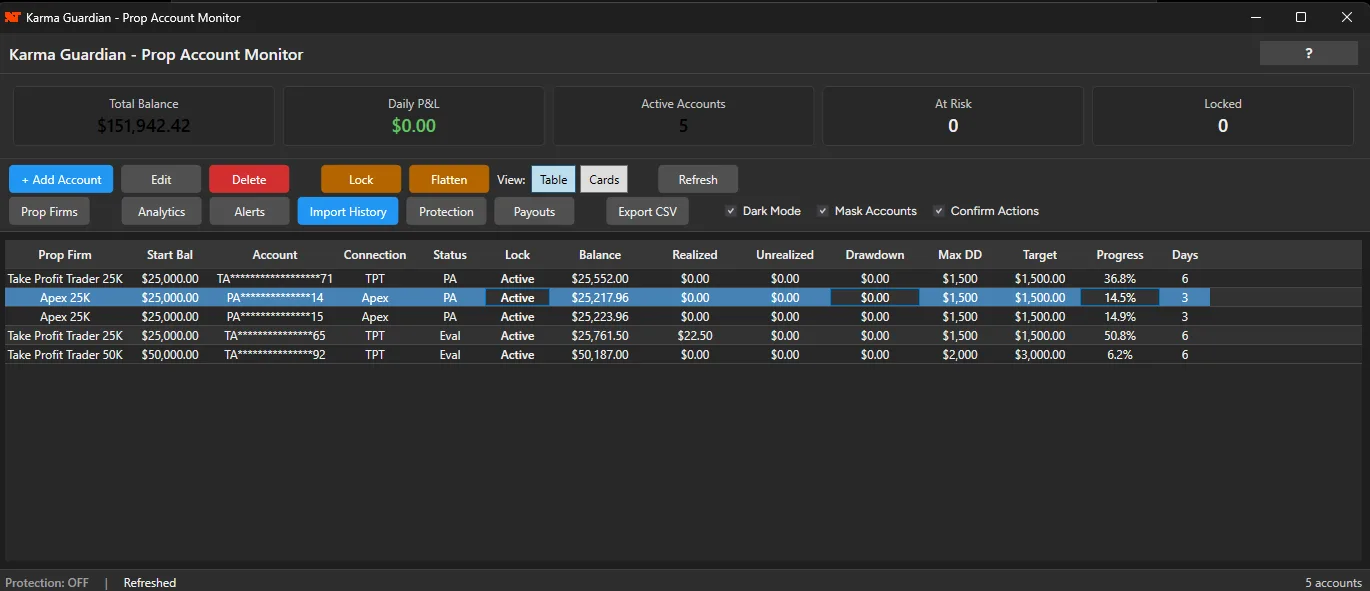
Discipline Master is the enforcement layer: max daily loss, trades-per-day caps, and trading-hours windows, with automatic flattening, entry blocking, an enforced unlock cooldown, and a timestamped violation log. It comes with a free 30-day trial. Karma Guardian is the monitoring layer: unlimited accounts, 1-5 second sync, customizable alerts, and preset rules for major prop firms — $15/month after a 30-day free trial. Both run natively in NinjaTrader 8, and Trade Disciple respects Karma Guardian lockouts when copying orders.

Discipline Master account table with the GLOBAL LOCKOUT button in the toolbar and per-account status

Discipline Master: the GLOBAL LOCKOUT button in the toolbar locks every account in the table.

Karma Guardian dashboard table of five prop-firm accounts with balance, drawdown, target progress and days traded

Karma Guardian: every connected account in one table, with drawdown and target progress.

Risk management add-on FAQ

What does a risk management add-on for NinjaTrader do?

A risk management add-on enforces trading rules inside NinjaTrader 8 automatically: it tracks limits like maximum daily loss, trades per day, and allowed trading hours, and when a rule is breached it flattens open positions and blocks new entries for the session. It replaces willpower with software at the moment willpower is least reliable.

What is the difference between account monitoring and rule enforcement?

Monitoring shows you the state of your accounts in real time — equity, drawdown buffer, P&L — and alerts you as you approach limits. Karma Guardian is built around monitoring, with one built-in protection level: warning and lockout thresholds (drawdown, daily loss, max trades, consecutive losses, daily profit target) that, once Auto-Protection is on, block new orders on an account that reaches a lockout level. Fuller enforcement acts on rules you define per instrument, time window and cooldown, and flattens positions; Discipline Master is that tool. Monitoring informs decisions, enforcement removes them. Serious multi-account traders typically run both.

Will a risk add-on work with prop firm evaluation accounts?

Yes — enforcement tools are most valuable on evaluation and funded accounts, where a single rule violation forfeits the evaluation fee or a funded account. Configure the add-on’s daily loss limit to match (or sit inside) your firm’s rule, and it enforces that limit for you. It can’t guarantee you pass an evaluation.

Can I set different rules for different instruments or accounts?

Good tools allow it. Discipline Master supports rules configured per instrument or applied globally, and Karma Guardian supports custom rule sets per account — which matters when you hold accounts at multiple firms with different limits.

Does Discipline Master send my trading data anywhere?

No. Discipline Master sends limited telemetry to BadBuddha servers — installation events, session starts, product version, and license identifier — used for license validation and troubleshooting. Your trades, positions, P&L, account numbers, balances, and chart data never leave your computer. Telemetry is required for licensing and cannot be disabled.

How much does a NinjaTrader risk management add-on cost?

Pricing across the category ranges from free utilities to significant monthly subscriptions. Karma Guardian (monitoring with built-in lockouts) is $15/month after a 30-day free trial. Discipline Master (custom enforcement) is $10/month after a 30-day free trial.

Sources and further reading

Official pages for the facts in this guide, last opened October 2026. Rules and schedules change, so check the source before relying on it.