 Bad
Bad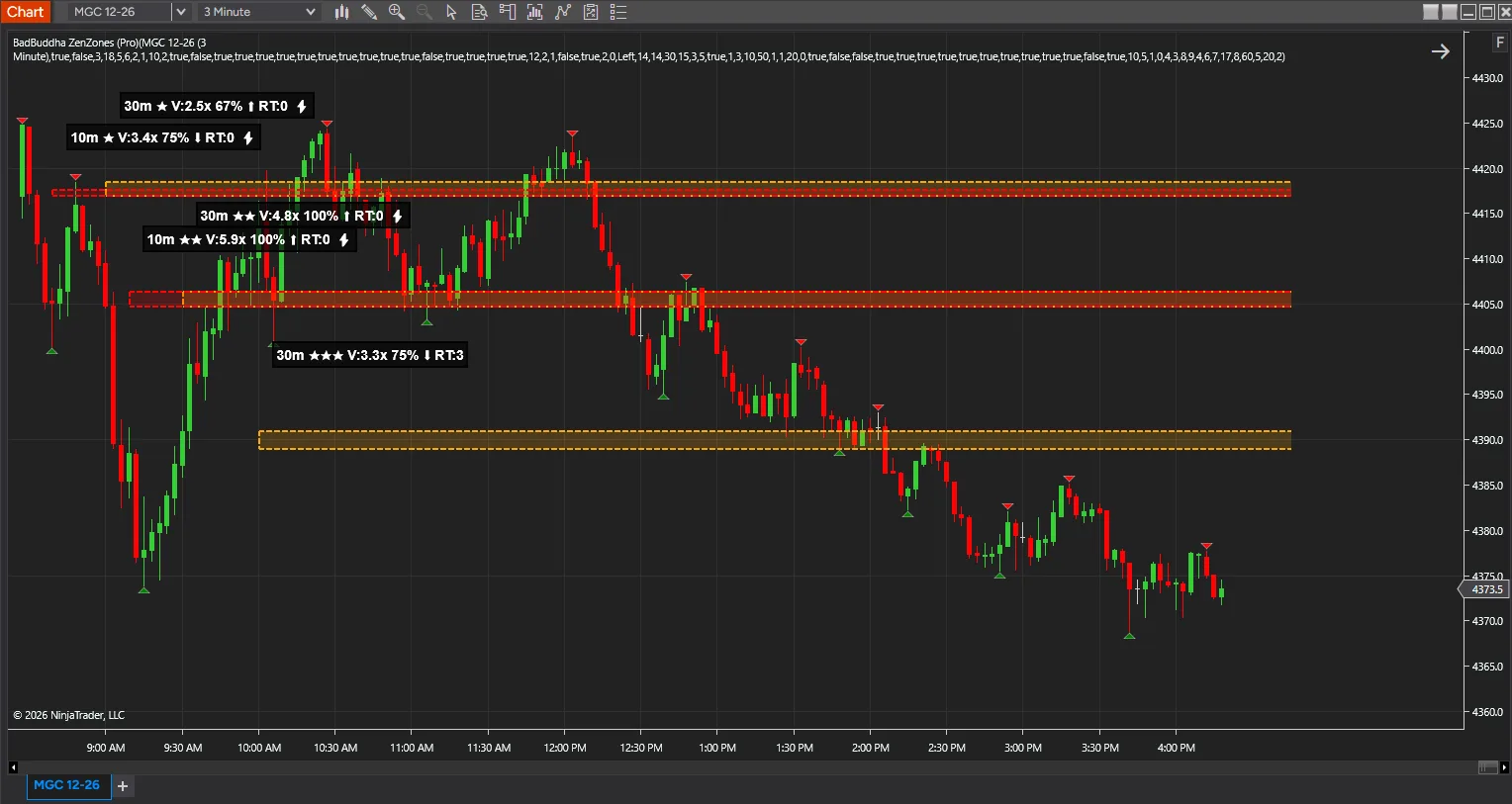
ZenZones Pro
$75.00
Not sure yet? Try the free Lite version first
✓ Payment received — thank you! Transaction ID:
Pro tools need activation: email your NinjaTrader User ID to support@badbuddhacustoms.com (see the Getting Started guide).
Something went wrong completing the payment. Please try again, or email info@badbuddhacustoms.com and we'll sort it out.
Your payment was approved, but we couldn't confirm it in the browser. Please don't pay again. Check your PayPal account, then email info@badbuddhacustoms.com and we'll confirm your order and send the download.
The PayPal checkout couldn't load — this is usually an ad or content blocker. Allow paypal.com and reload the page, or email info@badbuddhacustoms.com to order directly.
Version 4.0.0.0 · One-time purchase. All sales final per our No Returns Policy — try the free Lite version first.
Three higher timeframes at once, and a chart that tells you which zones matter. ZenZones Pro runs the same momentum-zone engine as Lite across three timeframes simultaneously, then rates, ranks and filters what it finds. Lite shows you the zones; Pro tells you which ones matter.
Multi-timeframe confluence
Pro watches three higher timeframes at once — 10 minutes, 30 minutes and 1 hour by default — and detects where their zones overlap within a tick tolerance you set. A level that three timeframes independently marked is a materially different proposition from one a single timeframe found, and confluent zones are highlighted and flagged on their label.
Zone success-rate tracking
Pro records every time price touches a zone and whether that zone held or broke, then reports a running hold percentage on the label. Zones below a minimum success rate can be filtered out entirely. It is feedback on how this instrument has actually been behaving at these levels — not a forecast.
Re-test zones
When a zone breaks, Pro can keep it as a re-test zone in a distinct dashed style, on the principle that broken support becomes resistance. Three modes: remove it, flip it to a re-test zone, or keep both.
Ranking that goes beyond volume
Market structure integration identifies swing highs and lows and boosts zones sitting at structurally significant price, so a zone at a swing point outranks an identical one mid-range. A volume profile built inside each zone adjusts strength by where the high-volume node sits. Overlapping same-direction zones merge into one, with a strength bonus and a merge count on the label, so a cluster never becomes a smear. Strength scoring itself is selectable — volume only, body only, or combined.
Control over what you see
Ten timeframe choices from one minute to daily, up to twenty zones per timeframe, and session filtering that restricts zones to today, today and yesterday, this week, this month, or the current session, with configurable Asian, European and US hours. Older zones fade progressively so recent structure reads more strongly. Four colour schemes — by direction, timeframe, strength, or fully custom — with the timeframe-based default keeping all three visually separable.
Calculates on bar close and does not repaint. Twenty settings groups against Lite’s nine.
From Checkout to Chart
Same NinjaScript import as every NinjaTrader 8 add-on.
Purchase & download
Complete the PayPal checkout above; the download button appears right on this page after payment.
Import into NinjaTrader 8
Control Center → Tools → Import → NinjaScript Add-On, then select the downloaded file. Don’t unzip it first.
Activate
Email your NinjaTrader User ID (and PayPal transaction ID) to info@badbuddhacustoms.com — activation is tied to your NinjaTrader user, not a machine. Details in the Getting Started guide.
Stay current
BadBuddha tools include an update checker that tells you inside NinjaTrader when a new version ships — and this page always serves the latest build.
Lite vs PRO
Both tiers find the same hot candles and draw the same zones. Lite watches one higher timeframe; Pro watches three at once and ranks what it finds. Lite shows you the zones — Pro tells you which ones matter.
| Feature | ZenZones Lite Free | ZenZones Pro $75 |
|---|---|---|
| Price | Free | $75 one-time |
| Simultaneous higher timeframes | One | Three |
| Timeframe choices | 1, 5, 10, 15, 30 and 60 minutes | Ten, from 1 minute to daily |
| Zones on screen | Five in total | Up to twenty per timeframe |
| Zone strength, 1–5 stars | Yes | Yes |
| Strength scoring | Volume and body combined | Selectable — volume, body, or combined |
| Volume-weighted opacity | Yes | Yes |
| Invalidation on close through | Yes | Yes |
| Zone label | Timeframe, stars and volume multiple | Adds confluence, hold rate and merge count |
| Multi-timeframe confluence | — | Yes, within a tick tolerance you set |
| Zone success-rate tracking | — | Yes, with a minimum hold rate filter |
| Re-test zones after a break | — | Remove, flip, or keep both |
| Market structure ranking | — | Boosts zones at swing highs and lows |
| Volume profile inside zones | — | Yes |
| Zone merging | — | Same-direction zones combine, with a merge count |
| Session filtering | — | Today, week, month or session, with configurable hours |
| Zone aging | — | Older zones fade progressively |
| Colour control | Green and red by direction | Four schemes, including per-timeframe |
| Settings groups | Nine | Twenty |
| Licence | None | Vendor licence |
ZenZones Pro FAQ
How much does ZenZones Pro cost?
$75.00 as a one-time purchase — there is no subscription or renewal. Checkout is via PayPal and accepts PayPal balance, Pay Later, and debit or credit cards.
How do I install ZenZones Pro?
Download the .zip, then in NinjaTrader 8 go to Control Center → Tools → Import → NinjaScript Add-On and select the file (don’t unzip it first). Full walkthrough in our Getting Started guide.
What does ZenZones Pro do that Lite doesn't?
Both tiers find the same hot candles and draw the same zones on the wick left behind. Pro runs three higher timeframes simultaneously and flags confluence where their zones overlap within a tick tolerance you set — a level three timeframes independently marked is a different proposition from one a single timeframe found. Pro also tracks how often each zone has held and reports it on the label, keeps broken zones as re-test zones, ranks zones sitting at swing highs and lows more highly, builds a volume profile inside each zone, and merges overlapping same-direction zones.
What is the refund policy?
All sales are final, per our No Returns Policy — digital tools can’t be returned. That is exactly why free Lite editions exist: try before you buy.
How do updates work?
Every BadBuddha tool ships with a built-in update checker — when a new version is released, NinjaTrader lets you know, and the download on this page always serves the current build.
Where do I get support?
Email info@badbuddhacustoms.com with "ZenZones Pro" in the subject line. Questions, bug reports, and feature ideas are all welcome.