 Bad
Bad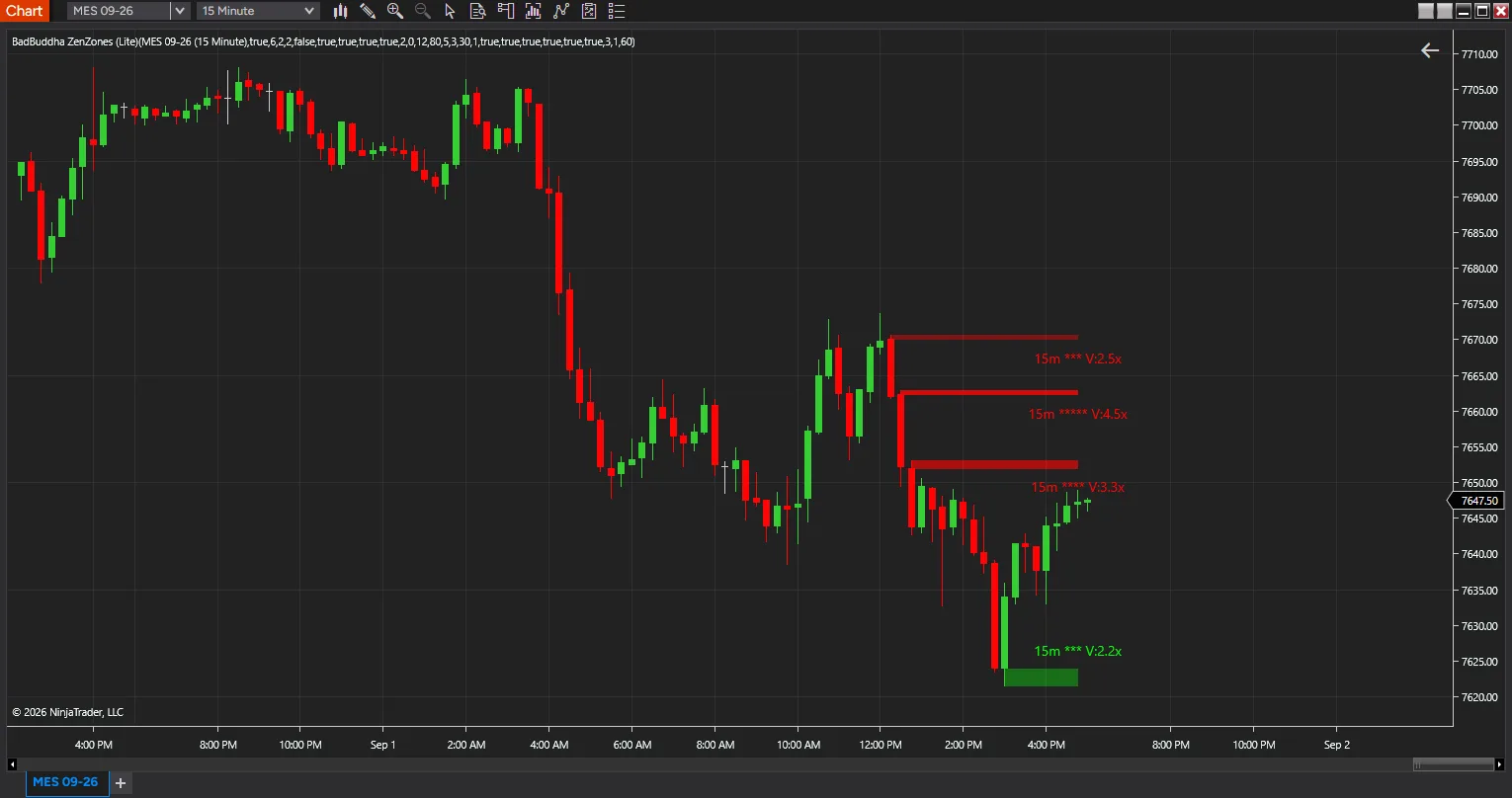
ZenZones Lite
FREE
Need the full feature set? Upgrade to ZenZones Pro — $75
Version 4.0.0.0 · Free tool — no signup required. See the install guide to get it on your chart.
Higher-timeframe momentum zones, drawn on the chart you trade. ZenZones finds the candles where a market actually committed — an unusually large body on unusually heavy volume — and draws a zone on the wick that candle left behind. The idea is that the wick of a high-conviction move marks a price level participants defended, and that price often reacts there again later.
How a hot candle is found
A candle qualifies only when both conditions hold on the higher timeframe you select: its body exceeds the rolling standard deviation of body size over the lookback window, and its volume exceeds the rolling average volume by your Hot Threshold. Requiring both is the point — a big candle on thin volume is noise, and heavy volume on a small candle is churn. ZenZones marks only the intersection.
Where the zone is drawn
The zone is not the whole candle. It spans the wick the move left behind: on a bullish candle, from the bottom of the body down to the low — the demand that absorbed the sellers; on a bearish candle, from the top of the body up to the high. That is the unfilled part of the move, and the region price has to trade back into.
Strength, in stars
Each zone is rated one to five stars from how far above average its volume and body were. Zone opacity scales with volume too, so heavier zones render more solidly and the chart communicates conviction without you reading a single label. A minimum star rating suppresses weak zones entirely.
When a zone is invalidated
A zone is removed once price closes through it for a set number of consecutive bars. Body Only is the default — the candle body must close through, so a single wick probe does not clear a level — with Full Candle available if you want any wick through to count.
What Lite includes
One higher timeframe at a time, chosen from 1, 5, 10, 15, 30 or 60 minutes, and up to five zones on screen. It is not a trial: there is no licence, no clock, and no expiry. It is the single-timeframe version of the tool, and it is genuinely useful on its own.
Calculates on bar close and does not repaint — a zone appears when its higher-timeframe candle closes, and does not move afterwards.
Install in Under a Minute
Same NinjaScript import as every NinjaTrader 8 add-on.
Download the .zip
Hit the download button above — no account or checkout for free tools.
Import into NinjaTrader 8
Control Center → Tools → Import → NinjaScript Add-On, then select the downloaded file. Don’t unzip it first.
Add it to a chart
Open a chart → right-click → Indicators (or the relevant menu) → add ZenZones Lite and configure it to taste.
Stay current
BadBuddha tools include an update checker that tells you inside NinjaTrader when a new version ships — and this page always serves the latest build.
Lite vs PRO
Both tiers find the same hot candles and draw the same zones. Lite watches one higher timeframe; Pro watches three at once and ranks what it finds. Lite shows you the zones — Pro tells you which ones matter.
| Feature | ZenZones Lite Free | ZenZones Pro $75 |
|---|---|---|
| Price | Free | $75 one-time |
| Simultaneous higher timeframes | One | Three |
| Timeframe choices | 1, 5, 10, 15, 30 and 60 minutes | Ten, from 1 minute to daily |
| Zones on screen | Five in total | Up to twenty per timeframe |
| Zone strength, 1–5 stars | Yes | Yes |
| Strength scoring | Volume and body combined | Selectable — volume, body, or combined |
| Volume-weighted opacity | Yes | Yes |
| Invalidation on close through | Yes | Yes |
| Zone label | Timeframe, stars and volume multiple | Adds confluence, hold rate and merge count |
| Multi-timeframe confluence | — | Yes, within a tick tolerance you set |
| Zone success-rate tracking | — | Yes, with a minimum hold rate filter |
| Re-test zones after a break | — | Remove, flip, or keep both |
| Market structure ranking | — | Boosts zones at swing highs and lows |
| Volume profile inside zones | — | Yes |
| Zone merging | — | Same-direction zones combine, with a merge count |
| Session filtering | — | Today, week, month or session, with configurable hours |
| Zone aging | — | Older zones fade progressively |
| Colour control | Green and red by direction | Four schemes, including per-timeframe |
| Settings groups | Nine | Twenty |
| Licence | None | Vendor licence |
ZenZones Lite FAQ
Is ZenZones Lite really free?
Yes — it's a free BadBuddha tool. No trial clock, no account, no activation; download it and use it.
How do I install ZenZones Lite?
Download the .zip, then in NinjaTrader 8 go to Control Center → Tools → Import → NinjaScript Add-On and select the file (don’t unzip it first). Full walkthrough in our Getting Started guide.
What does ZenZones Pro add over Lite?
Lite watches one higher timeframe and shows up to five zones. Pro watches three at once, from ten choices between one minute and daily, and up to twenty zones per timeframe. It then ranks what it finds: confluence where zones from different timeframes overlap, a running hold percentage for each zone, re-test zones when one breaks, market-structure and volume-profile weighting, and zone merging. Lite shows you the zones; Pro tells you which ones matter.
Does it work on prop-firm evaluation and funded accounts?
Yes. BadBuddha tools run locally inside your NinjaTrader 8 platform and work the same on sim, evaluation, and funded accounts regardless of broker or prop firm.
How do updates work?
Every BadBuddha tool ships with a built-in update checker — when a new version is released, NinjaTrader lets you know, and the download on this page always serves the current build.
Where do I get support?
Email info@badbuddhacustoms.com with "ZenZones Lite" in the subject line. Questions, bug reports, and feature ideas are all welcome.