 Bad
Bad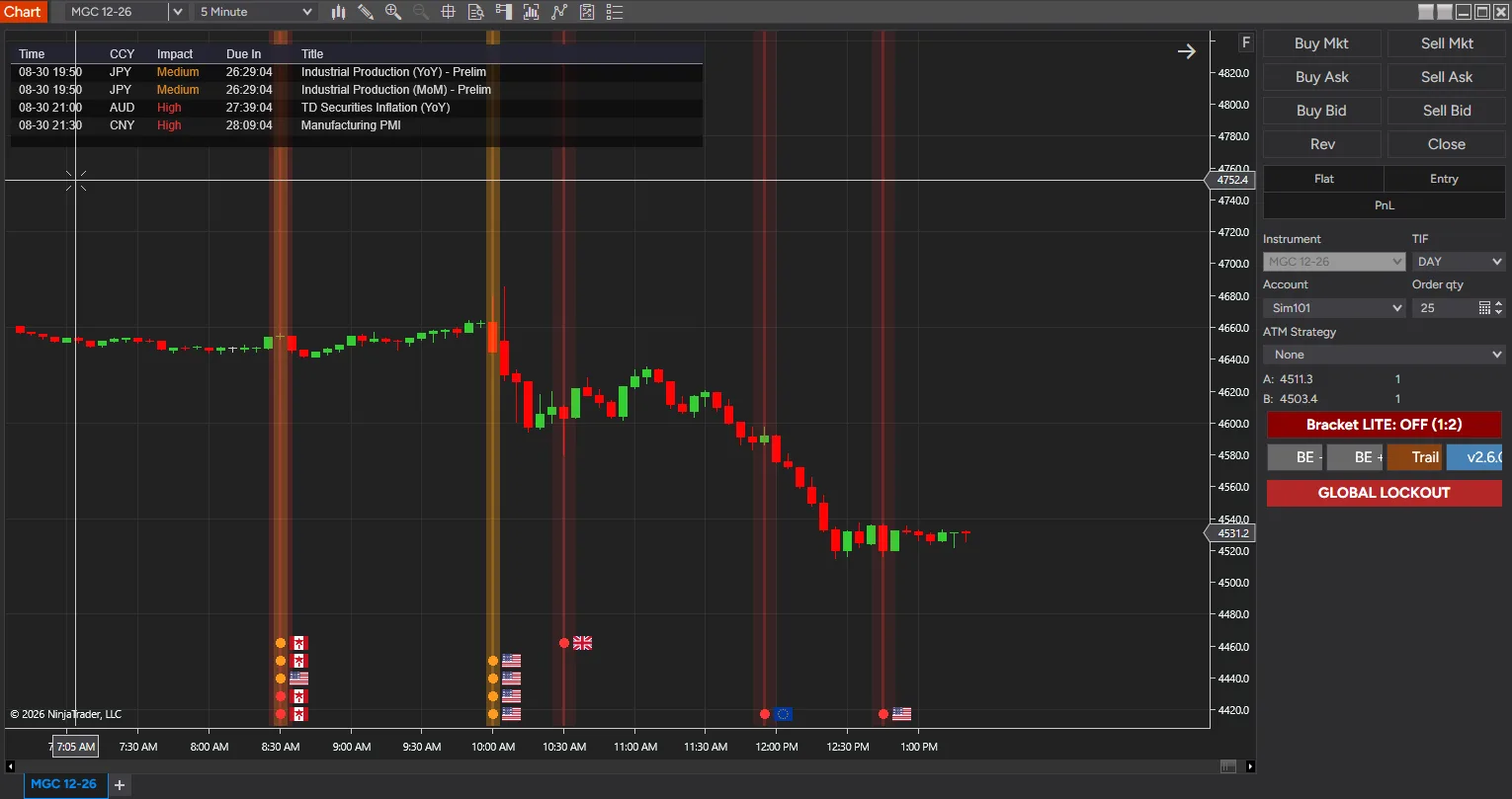
News Markers PRO for NinjaTrader 8
$50.00
Not sure yet? Try the free Lite version first
✓ Payment received — thank you! Transaction ID:
Pro tools need activation: email your NinjaTrader User ID to support@badbuddhacustoms.com (see the Getting Started guide).
Something went wrong completing the payment. Please try again, or email info@badbuddhacustoms.com and we'll sort it out.
Your payment was approved, but we couldn't confirm it in the browser. Please don't pay again. Check your PayPal account, then email info@badbuddhacustoms.com and we'll confirm your order and send the download.
The PayPal checkout couldn't load — this is usually an ad or content blocker. Allow paypal.com and reload the page, or email info@badbuddhacustoms.com to order directly.
Version 6.1.0.0 · One-time purchase. All sales final per our No Returns Policy — try the free Lite version first.
Advanced real-time economic news integration for NinjaTrader® 8. News Markers PRO is the next evolution of our News Markers Lite Pack, built for traders who want full situational awareness around scheduled economic events. It marks release times directly on the chart, counts down to what is coming, and can tell an automated strategy to stand aside while it happens. Designed from the ground up for NinjaTrader 8.1+.
Filter economic events by impact and currency
PRO reads economic calendar data — date, time, country, currency, impact level, event title, and actual/forecast/previous values — and filters it by impact (High, Medium, Low) and by currency. Auto-by-Instrument mode works out which currencies actually affect the instrument on your chart; Custom Currency List mode lets you name them yourself. Its date range covers the current week, so you can see what has already printed and what is still to come.
News blackout windows your NinjaScript strategy can read
PRO knows when price is within a configurable window of an upcoming high-impact release, and exposes that state through public series your NinjaScript strategies can read directly: InNewsWindowSeries (1.0 inside a blackout, 0.0 outside), MinutesToNextHighSeries, MinutesToNextMediumSeries, and UpcomingEventTitle. An automated strategy can pause, flatten, or change behaviour around news instead of trading blindly into it.
Live countdowns, an events table, and news alerts
A popout Events Table window lists everything upcoming with a “Due In” countdown, and on-chart countdown timers update in real time. Audio and visual alerts fire ahead of events, with the lead time configurable.
Clean chart rendering with country flags
SharpDX rendering keeps the overlay smooth, with country flag icons, stacked event dots where several releases share a time, and click-to-expand detail panels for the full figures.
From Checkout to Chart
Same NinjaScript import as every NinjaTrader 8 add-on.
Purchase & download
Complete the PayPal checkout above; the download button appears right on this page after payment.
Import into NinjaTrader 8
Control Center → Tools → Import → NinjaScript Add-On, then select the downloaded file. Don’t unzip it first.
Activate
Email your NinjaTrader User ID (and PayPal transaction ID) to info@badbuddhacustoms.com — activation is tied to your NinjaTrader user, not a machine. Details in the Getting Started guide.
Stay current
BadBuddha tools include an update checker that tells you inside NinjaTrader when a new version ships — and this page always serves the latest build.
Lite vs PRO
Both editions install the same way and run on the same charts. Lite marks today’s releases; PRO adds filtering, countdowns, and the blackout state an automated strategy can read.
| Feature | News Markers Lite Pack Free | News Markers PRO $50 |
|---|---|---|
| Price | Free | $50 one-time |
| Impact levels shown | High and Medium | High, Medium and Low |
| Events shown | Today only | The current week |
| Country flags at event time | Yes | Yes |
| Filter by currency | — | Auto-by-Instrument, or a custom currency list |
| On-chart countdown timers | — | Yes, updating in real time |
| Popout events table | — | Yes, with a Due In countdown per release |
| Audio and visual alerts | — | Yes, with configurable lead time |
| News blackout windows | — | Yes, configurable around high-impact releases |
| Readable by a NinjaScript strategy | — | InNewsWindowSeries, MinutesToNextHighSeries, MinutesToNextMediumSeries, UpcomingEventTitle |
| Requires | NinjaTrader 8 | NinjaTrader 8.1 or later |
News Markers PRO for NinjaTrader 8 FAQ
How much does News Markers PRO for NinjaTrader 8 cost?
$50.00 as a one-time purchase — there is no subscription or renewal. Checkout is via PayPal and accepts PayPal balance, Pay Later, and debit or credit cards.
How do I install News Markers PRO for NinjaTrader 8?
Download the .zip, then in NinjaTrader 8 go to Control Center → Tools → Import → NinjaScript Add-On and select the file (don’t unzip it first). Full walkthrough in our Getting Started guide.
What does News Markers PRO do that the Lite version doesn't?
Lite marks today’s High and Medium impact events with flags and optional guide lines. PRO filters events by impact level and by currency — Auto-by-Instrument works out which currencies affect your chart, or you can name them yourself — and shows the whole current week instead of just today. It adds live countdowns, a popout Events Table, configurable audio and visual alerts, and blackout windows exposed as NinjaScript series so strategies can pause around news. PRO requires NinjaTrader 8.1 or later.
Can a NinjaScript strategy react to news events automatically?
Yes. News Markers PRO exposes its blackout state through public series a strategy can read directly: InNewsWindowSeries (1.0 while price is inside a news blackout window, 0.0 otherwise), MinutesToNextHighSeries, MinutesToNextMediumSeries, and UpcomingEventTitle. A strategy can use those to pause, flatten, or change behaviour ahead of a high-impact release instead of trading into it.
How does News Markers PRO decide which events to show?
Events are filtered by impact level — High, Medium, or Low — and then by currency. Auto-by-Instrument mode works out which currencies actually affect the instrument on your chart, while Custom Currency List mode lets you specify exactly which ones to display, so the chart is not cluttered with releases that cannot move your market.
What is a blackout window?
A blackout window is a configurable period around an upcoming high-impact release. News Markers PRO tracks when price is inside one and reports it both on the chart and through a series your strategies can read, so you have a defined window to stand aside rather than judging it by eye.
What is the refund policy?
All sales are final, per our No Returns Policy — digital tools can’t be returned. That is exactly why free Lite editions exist: try before you buy.
How do updates work?
Every BadBuddha tool ships with a built-in update checker — when a new version is released, NinjaTrader lets you know, and the download on this page always serves the current build.
Where do I get support?
Email info@badbuddhacustoms.com with "News Markers PRO for NinjaTrader 8" in the subject line. Questions, bug reports, and feature ideas are all welcome.
Before you buy
Vendor-neutral guides covering what this tool is for — useful whether or not you buy it.
- How to pause a NinjaScript strategy around news releases
Working code for reading the blackout series from a strategy, and what a news filter really does to a backtest.
- How to avoid trading during news in NinjaTrader 8
Which releases actually move your instrument, and how long a blackout window should be.