 Bad
Bad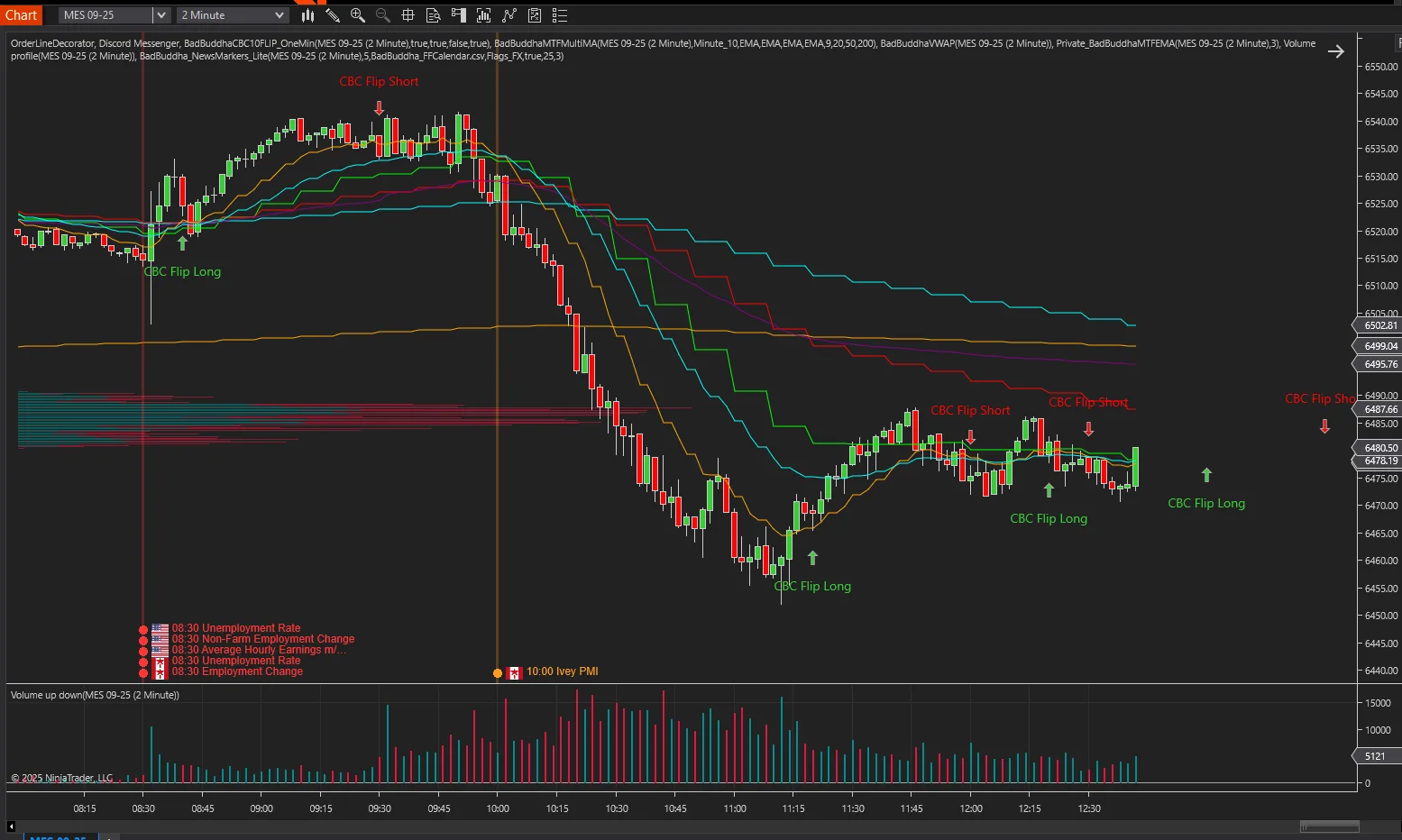
News Markers Lite Pack for NinjaTrader 8
FREE
Need the full feature set? Upgrade to News Markers PRO for NinjaTrader 8 — $50
Version 2.6.1.0 · Free tool — no signup required. See the install guide to get it on your chart.
See today’s market-moving headlines right on your chart — and fetch them in one click.
What’s in the free News Markers Lite pack
-
News Markers Lite (Indicator) — Plots today’s High (red) and Medium (orange) impact events at the exact minute on any intraday chart. Shows the country flag and an optional vertical guide line you can toggle.
-
News Downloader Lite (Utility Indicator) — Grabs the latest calendar and saves it to your NinjaTrader Documents folder for the Markers to use. No browser, no copy-paste.
-
Update alerting service
Why put the economic calendar on your chart
-
Trade the chart, not a calendar tab — Flags + colors tell you what’s coming at a glance.
-
Clean by design — Today only, High/Medium only. Zero visual clutter.
-
One-click updates — Pull fresh data from inside NinjaTrader.
-
Lightweight & smooth — Optimized for Minute/Second/Tick/Renko.
How to set up News Markers Lite in NinjaTrader 8
-
Import the Lite Pack (.zip) into NinjaTrader: Tools → Import → NinjaScript Add-On.
-
Drop the included flag PNGs into Documents\NinjaTrader 8\Flags_FX.
-
Apply News Downloader Lite to any chart and press Download (or your update button).
-
Apply News Markers Lite to your intraday chart.
-
(Optional) Toggle “Show Vertical Line” if you want a guide line at each event time.
Key features
-
High/Medium events only (red/orange)
-
Country flags rendered at event time
-
Vertical guide line (on/off toggle)
-
Local time conversion (no manual offsets)
-
Intraday only (Minute/Second/Tick/Renko)
What Lite does not do
-
Today’s session only (no historical plotting)
-
No low/holiday filters or advanced styling
-
Minimal settings for speed and simplicity
Requirements
-
NinjaTrader 8 (Windows 10/11, 64-bit)
-
Intraday data series
-
Read/write access to Documents\NinjaTrader 8
Troubleshooting
-
Flags not showing? Confirm PNG names (e.g., US.png, EU.png, GB.png) live in Documents\NinjaTrader 8\Flags_FX.
-
No events plotting? Run News Downloader Lite first to refresh the CSV; ensure your chart is intraday.
-
Times look off? Verify your Windows time zone and that “Convert CSV Time → Local” is on.
Install in Under a Minute
Same NinjaScript import as every NinjaTrader 8 add-on.
Download the .zip
Hit the download button above — no account or checkout for free tools.
Import into NinjaTrader 8
Control Center → Tools → Import → NinjaScript Add-On, then select the downloaded file. Don’t unzip it first.
Add it to a chart
Open a chart → right-click → Indicators (or the relevant menu) → add News Markers Lite Pack for NinjaTrader 8 and configure it to taste.
Stay current
BadBuddha tools include an update checker that tells you inside NinjaTrader when a new version ships — and this page always serves the latest build.
Lite vs PRO
Both editions install the same way and run on the same charts. Lite marks today’s releases; PRO adds filtering, countdowns, and the blackout state an automated strategy can read.
| Feature | News Markers Lite Pack Free | News Markers PRO $50 |
|---|---|---|
| Price | Free | $50 one-time |
| Impact levels shown | High and Medium | High, Medium and Low |
| Events shown | Today only | The current week |
| Country flags at event time | Yes | Yes |
| Filter by currency | — | Auto-by-Instrument, or a custom currency list |
| On-chart countdown timers | — | Yes, updating in real time |
| Popout events table | — | Yes, with a Due In countdown per release |
| Audio and visual alerts | — | Yes, with configurable lead time |
| News blackout windows | — | Yes, configurable around high-impact releases |
| Readable by a NinjaScript strategy | — | InNewsWindowSeries, MinutesToNextHighSeries, MinutesToNextMediumSeries, UpcomingEventTitle |
| Requires | NinjaTrader 8 | NinjaTrader 8.1 or later |
News Markers Lite Pack for NinjaTrader 8 FAQ
Is News Markers Lite Pack for NinjaTrader 8 really free?
Yes — it's a free BadBuddha tool. No trial clock, no account, no activation; download it and use it.
How do I install News Markers Lite Pack for NinjaTrader 8?
Download the .zip, then in NinjaTrader 8 go to Control Center → Tools → Import → NinjaScript Add-On and select the file (don’t unzip it first). Full walkthrough in our Getting Started guide.
What does News Markers PRO add over the Lite pack?
The Lite pack marks today’s High and Medium impact events on intraday charts with country flags and an optional vertical guide line. PRO adds filtering by impact level and by currency (either automatically from your chart’s instrument, or from a currency list you specify), a view of the current week rather than today only, live countdown timers, a popout Events Table with “Due In” countdowns, configurable audio and visual alerts, and blackout windows that automated strategies can read directly. PRO targets NinjaTrader 8.1 and later.
Does it work on prop-firm evaluation and funded accounts?
Yes. BadBuddha tools run locally inside your NinjaTrader 8 platform and work the same on sim, evaluation, and funded accounts regardless of broker or prop firm.
How do updates work?
Every BadBuddha tool ships with a built-in update checker — when a new version is released, NinjaTrader lets you know, and the download on this page always serves the current build.
Where do I get support?
Email info@badbuddhacustoms.com with "News Markers Lite Pack for NinjaTrader 8" in the subject line. Questions, bug reports, and feature ideas are all welcome.
Before you buy
Vendor-neutral guides covering what this tool is for — useful whether or not you buy it.
- How to avoid trading during news in NinjaTrader 8
Which releases actually move your instrument, and how long a blackout window should be.
- How to pause a NinjaScript strategy around news releases
What an automated strategy needs in order to stand aside for a release — and why Lite cannot do it.