Bad
Cross-market confirmation
Check that the index you trade is not fighting its sibling — an NQ long while ES flips bearish is a different trade than one with both aligned.
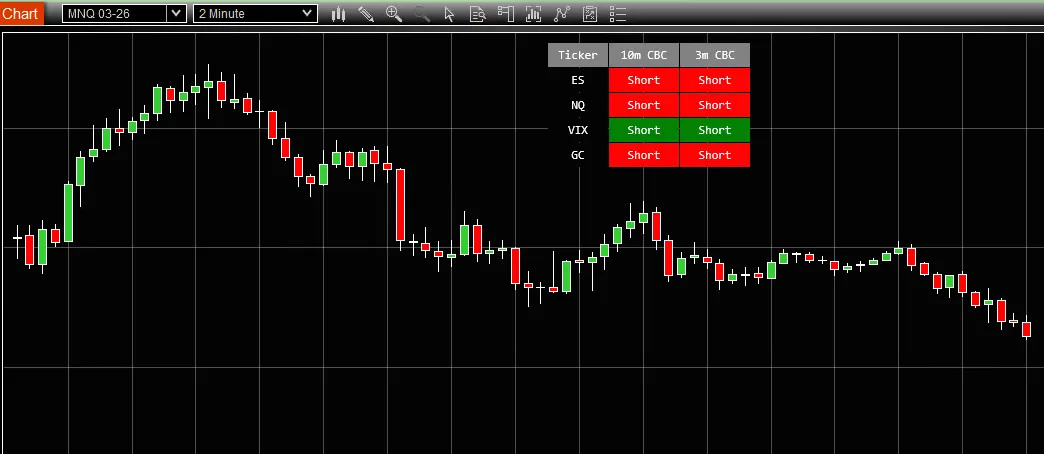
Shows Candle-By-Candle (CBC) signals for ES, NQ and VIX in a compact table on your chart.
CBC Table is a free tool from BadBuddha's Library — download it and drop it straight into NinjaTrader 8.
Download CBC TableVersion 1.3.0.0 · Installs like every BadBuddha tool — see the install guide. Free tools need no activation.
Candle-by-Candle (CBC) reading is the discipline of taking each closed candle as its own piece of evidence — did the bar confirm the current bias, or flip it? The BadBuddha CBC Table condenses that read for the instruments futures traders actually cross-reference: the S&P 500 (ES), the Nasdaq (NQ), and the VIX volatility index.
Instead of flipping between three charts to check whether the indexes and volatility agree, the table overlays the current candle-by-candle signal for each market in one compact panel on the chart you are already trading. When ES and NQ point the same way while the VIX confirms, you know it at a glance — and when they disagree, that is worth knowing before an entry too.
Check that the index you trade is not fighting its sibling — an NQ long while ES flips bearish is a different trade than one with both aligned.
The VIX row adds the risk backdrop: signals in calm and stressed tape deserve different sizing and expectations.
The table lives on your trading chart, so the check costs a glance instead of a chart switch mid-setup.
Same import as every NinjaTrader 8 add-on.
Use the download button above — no account, no checkout, no activation for free tools.
Control Center → Tools → Import → NinjaScript Add-On, then select the downloaded file. Do not unzip it first.
Open a chart → right-click → Indicators → find CBC Table in the list and configure it to taste.
BadBuddha tools include an update checker that tells you inside NinjaTrader when a new version ships.
Yes — CBC Table is part of BadBuddha's free library. There is no trial clock, no account, and no activation step; download it and use it.
The BadBuddha CBC Table displays Candle-by-Candle (CBC) trading signals for ES, NQ, and VIX together in a compact table overlaid on your chart, so you can read all three instruments without opening separate charts.
Download the .zip, then in NinjaTrader 8 go to Control Center → Tools → Import → NinjaScript Add-On and select the file (don’t unzip it first). Full walkthrough in the Getting Started guide.
It runs inside NinjaTrader 8 on whichever accounts your session is connected to, whether sim, evaluation or funded. It only draws on your chart and places no orders. It shows ES, NQ and VIX together, so your connection needs data for all three. Your prop firm’s rules are its own, so check them before you add any tool to a live account.
Every BadBuddha tool ships with a built-in update checker — when a new version is released, NinjaTrader lets you know and the download link on this page always serves the latest build.
Email support@badbuddhacustoms.com with the indicator name in the subject line. Questions, bug reports, and feature ideas are all welcome — free tools get real support too.
18 free and Pro indicators and add-ons built for NinjaTrader 8.