 Bad
BadBuddha CBC 10-Flip MTF
FREE
Version 2.2.0.0 · Free tool — no signup required. See the install guide to get it on your chart.
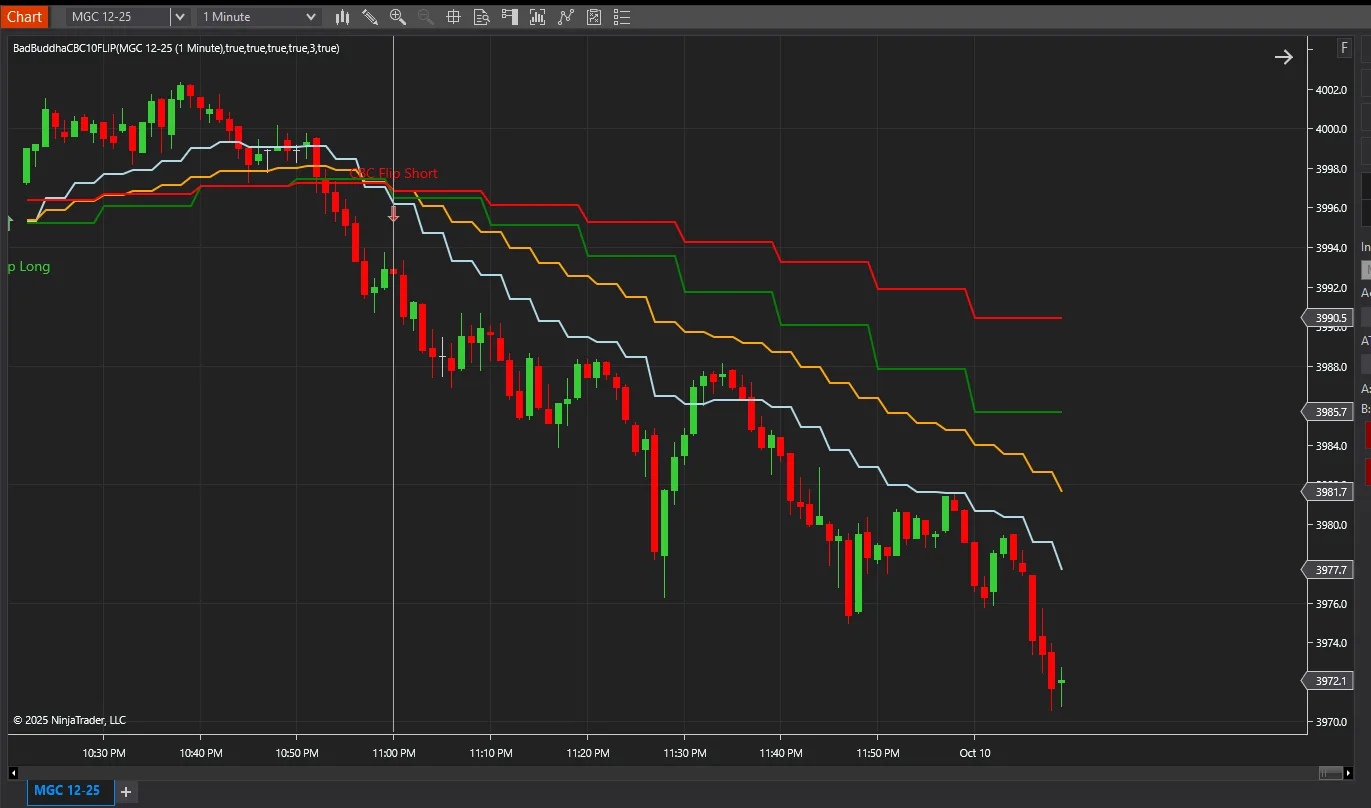
CBC‑Flip MultiTime marks higher-timeframe trend flips on the lower-timeframe chart you trade. It follows @MapleStax's Candle-By-Candle (CBC) flip idea on 10-minute bars and draws the result on your 1-minute chart, so you can see the bigger trend turn without switching charts.
What it plots on your chart
Flip arrows
Green up‑arrows when 10‑minute candles confirm a bullish flip, red down‑arrows for bearish flips, drawn on your 1‑minute chart.Higher-timeframe context
Act on a setup when the higher timeframe agrees with it, so you aren't trading against the bigger move.Both timeframes on one chart
It adds and syncs the larger bars for you, and alerts on every detected flip.Draws the 10-minute 9/20 EMA, the lower-timeframe 9/20 EMA and the flips on the same chart.
Alerts you when a new version is available.
Who it’s for
Breakout traders and trend followers who want the higher-timeframe bias on the chart they execute on. It shows direction. It doesn't tell you when to enter.
Install in Under a Minute
Same NinjaScript import as every NinjaTrader 8 add-on.
Download the .zip
Hit the download button above — no account or checkout for free tools.
Import into NinjaTrader 8
Control Center → Tools → Import → NinjaScript Add-On, then select the downloaded file. Don’t unzip it first.
Add it to a chart
Open a chart → right-click → Indicators (or the relevant menu) → add BadBuddha CBC 10-Flip MTF and configure it to taste.
Stay current
BadBuddha tools include an update checker that tells you inside NinjaTrader when a new version ships — and this page always serves the latest build.
BadBuddha CBC 10-Flip MTF FAQ
Is BadBuddha CBC 10-Flip MTF really free?
Yes — it's a free BadBuddha tool. No trial clock, no account, no activation; download it and use it.
How do I install BadBuddha CBC 10-Flip MTF?
Download the .zip, then in NinjaTrader 8 go to Control Center → Tools → Import → NinjaScript Add-On and select the file (don’t unzip it first). Full walkthrough in the Getting Started guide.
What signals does CBC-Flip MultiTime show?
It draws green up-arrows when 10-minute candles confirm a bullish flip and red down-arrows for bearish flips, plotted directly on your lower-timeframe chart — so you can trade a 1-minute chart while the 10-minute trend decides direction. It adds and syncs the higher-timeframe bars automatically and alerts on every detected flip.
Which moving averages does CBC-Flip MultiTime draw?
It draws the 9 and 20 EMAs from the 10-minute timeframe alongside the 9 and 20 EMAs of your lower timeframe, with the flip markers, all on the same chart.
Does it work on prop-firm evaluation and funded accounts?
It runs inside NinjaTrader 8 on whichever accounts your session is connected to, whether sim, evaluation or funded. It only draws on your chart and places no orders. It adds the 10-minute bars itself, from the same connection. Your prop firm’s rules are its own, so check them before you add any tool to a live account.
How do updates work?
Every BadBuddha tool ships with a built-in update checker — when a new version is released, NinjaTrader lets you know, and the download on this page always serves the current build.
Where do I get support?
Email support@badbuddhacustoms.com with "BadBuddha CBC 10-Flip MTF" in the subject line. Questions, bug reports, and feature ideas are all welcome.