 Bad
Bad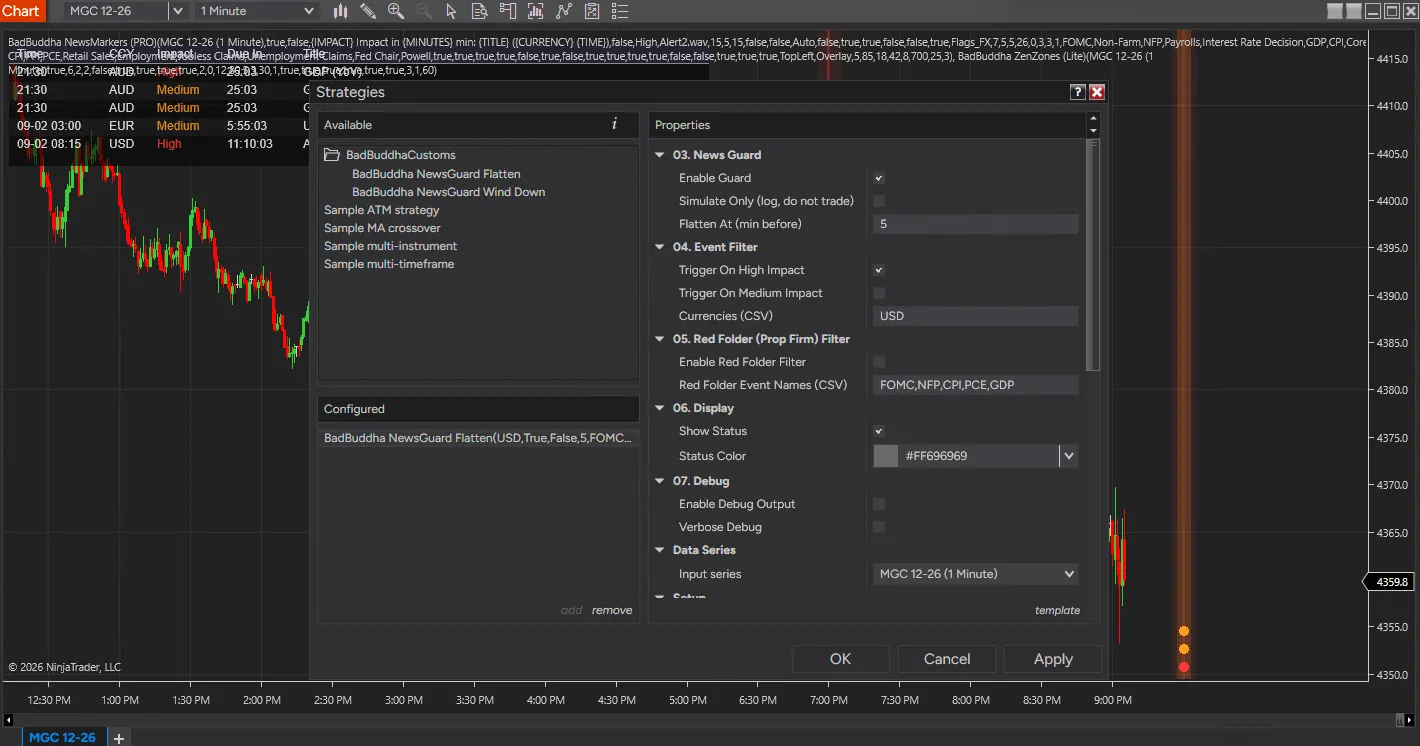
NewsGuard
FREE
Free tool — no signup required. See the install guide to get it on your chart.
Two NinjaTrader 8 strategies that get you out of the way before an economic release. NewsGuard is an exit manager for a position you already hold, whether you opened it by hand or another strategy did. NewsFlattenGuard closes the chart instrument in one step a set number of minutes before a qualifying release. NewsWindDownGuard brings the same position down in timed tranches instead, flattening at the final step. Both then confirm the position actually closed rather than assuming the order went through.
Two guards, one job
Flatten is the simpler of the pair. Pick a deadline in minutes — five by default — and the whole position is closed that far ahead of the release, then verified flat.
Wind Down works a ladder of minutes:percent rungs instead. The default 20:33,10:50,5:100 closes a third of the position twenty minutes out, half of what is left at ten minutes, and the remainder at five. Exposure comes down in stages, so part of the trade keeps working for longer while a flat book before the release is still guaranteed.
On a ten-contract position that default ladder closes three, then four, then the last three. A single contract is never partially reduced — it rides to the final rung and exits there, rather than being closed at the first rung as a rounding artefact.
Which releases count
- Impact — High impact by default, with Medium opt-in. Most traders only want the guard interrupting them for the big ones.
- Currency — a comma-separated allow-list such as
USD,EUR. An empty list matches nothing, which disables the guard rather than opening it up. - Red folder — an optional keyword filter on the event title, defaulting to
FOMC,NFP,CPI,PCE,GDP, for prop-firm rules written around named releases.
Fail loud, never fail-flat
The governing rule is that no data problem may cause an order, and no failure may leave a position unguarded while the chart claims the guard is armed. A degraded calendar feed, a missing News Markers PRO, or a ladder that will not parse each disarm the guard and say so in red. None of them ever triggers a protective flatten, because closing a live position on a data glitch or a typo is the worse of the two failures.
An on-chart status line reports what the guard is doing at all times: the next qualifying event and its countdown while armed, what was cut and when, or UNPROTECTED in red when it has stood down.
What it does not do
It never opens a position and never re-enters after the release. It touches no instrument other than the chart’s, and no account other than the one it is enabled on. Simulate Only logs every action it would take without submitting anything, which is the recommended way to run a first session.
Realtime only — this cannot be backtested
The economic calendar arrives as a live stream with no historical replay, so during a Strategy Analyzer run the guard is inert and a clean backtest says nothing whatever about its behaviour around news. A simulation account is the only meaningful test.
What this sample includes
Full NinjaScript source for both strategies — four .cs files, extracted into your Strategies folder and compiled in the NinjaScript Editor rather than imported. The decision logic sits in a deliberately platform-free core, so the part that decides how much of a position to close can be read on its own.
Requires a licensed News Markers PRO loaded on a chart in the same session: the economic calendar is read through PRO’s strategy API. Without one the guard disarms and says so.
Install in Under a Minute
Ships as NinjaScript source — copied in and compiled, not imported.
Download the .zip
Hit the download button above — no account or checkout.
Extract into your Strategies folder
Unzip the four .cs files into Documents\NinjaTrader 8\bin\Custom\Strategies\. Do extract this one — unlike our compiled tools, there is no NinjaScript import step.
Compile in the NinjaScript Editor
In NinjaTrader 8, open New → NinjaScript Editor and press F5. Both strategies appear in the Strategies list once the compile finishes clean.
Enable it on a chart
Add the strategy from the chart’s Strategies tab. A licensed News Markers PRO must be loaded on a chart in the same session — the calendar is read through it — and because the calendar has no historical replay, test on a simulation account rather than in the Strategy Analyzer.
NewsGuard FAQ
Is NewsGuard really free?
Yes — it's a free BadBuddha tool. No trial clock, no account, no activation; download it and use it.
How do I install NewsGuard?
Unlike our compiled tools, NewsGuard ships as NinjaScript source. Extract the four .cs files from the .zip into Documents\NinjaTrader 8\bin\Custom\Strategies\, then open the NinjaScript Editor in NinjaTrader 8 and press F5 to compile. Both strategies appear in the Strategies list afterwards. It also needs a licensed News Markers PRO loaded on a chart in the same session, which is where it reads the economic calendar from.
Does it work on prop-firm evaluation and funded accounts?
Yes. BadBuddha tools run locally inside your NinjaTrader 8 platform and work the same on sim, evaluation, and funded accounts regardless of broker or prop firm.
How do updates work?
Every BadBuddha tool ships with a built-in update checker — when a new version is released, NinjaTrader lets you know, and the download on this page always serves the current build.
Where do I get support?
Email info@badbuddhacustoms.com with "NewsGuard" in the subject line. Questions, bug reports, and feature ideas are all welcome.
Before you buy
Vendor-neutral guides covering what this tool is for — useful whether or not you buy it.
- How to pause a NinjaScript strategy around news releases
The do-it-yourself version of what NewsGuard automates — reading the blackout series from your own strategy.
- How to avoid trading during news in NinjaTrader 8
Which releases actually move your instrument, and how far ahead of one you should be flat.