 Bad
BadBuddha MTF Multi-MA
$10.00
✓ Payment received — thank you! Transaction ID:
Pro tools need activation: email your NinjaTrader User ID to support@badbuddhacustoms.com (see the Getting Started guide).
Something went wrong completing the payment. Please try again, or email support@badbuddhacustoms.com and I'll sort it out.
Your payment was approved, but the browser couldn't confirm it. Please don't pay again. Check your PayPal account, then email support@badbuddhacustoms.com and I'll confirm your order and send the download.
The PayPal checkout couldn't load — this is usually an ad or content blocker. Allow paypal.com and reload the page, or email info@badbuddhacustoms.com to order directly.
Version 2.4.0.0 · One-time purchase. All sales final per the No Returns Policy — try the free Lite version first.
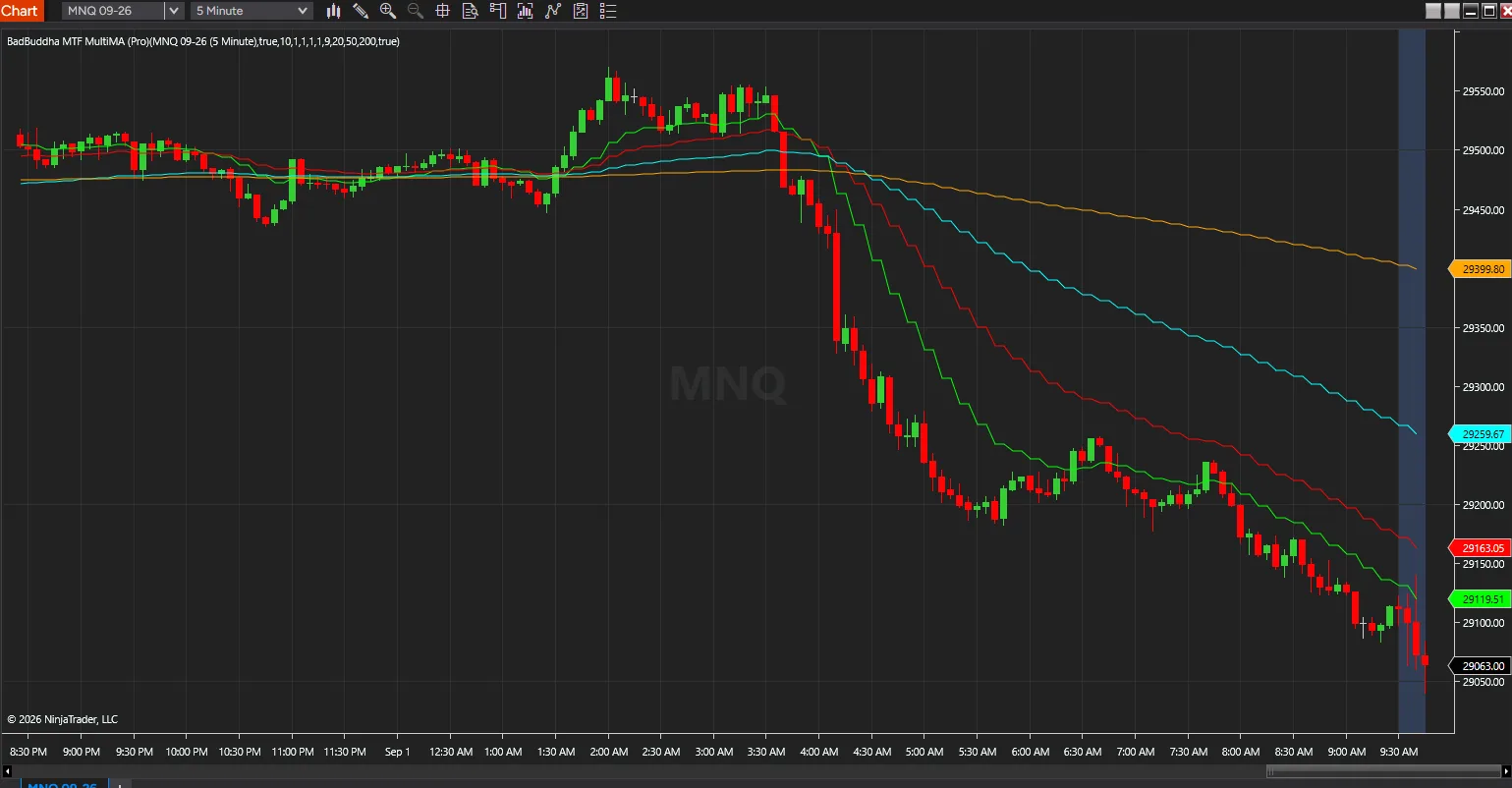
The BadBuddha Customs MTF MA stacks moving averages from several timeframes, bar types and average types on one chart, so you can see the larger trend without flipping between charts.
Trend confirmation across timeframes
- When the short, mid and long-term averages all point the same way, the trend has support from every timeframe you're watching. When they disagree, you can see that too.
Entries with the bigger picture in view
- Use fast averages on lower timeframes to time entries, anchored to the broader trend. It works well for pullback entries. It also helps filter setups that go against the dominant move.
One chart instead of several
- All the averages share one layout, so there is less clutter and no second chart to keep checking.
From Checkout to Chart
Same NinjaScript import as every NinjaTrader 8 add-on.
Purchase & download
Complete the PayPal checkout above; the download button appears right on this page after payment.
Import into NinjaTrader 8
Control Center → Tools → Import → NinjaScript Add-On, then select the downloaded file. Don’t unzip it first.
Activate
Email your NinjaTrader User ID (and PayPal transaction ID) to support@badbuddhacustoms.com — activation is tied to your NinjaTrader user, not a machine. Details in the Getting Started guide.
Stay current
BadBuddha tools include an update checker that tells you inside NinjaTrader when a new version ships — and this page always serves the latest build.
BadBuddha MTF Multi-MA FAQ
How much does BadBuddha MTF Multi-MA cost?
$10.00 as a one-time purchase — there is no subscription or renewal. Checkout is via PayPal and accepts PayPal balance, Pay Later, and debit or credit cards.
How do I install BadBuddha MTF Multi-MA?
Download the .zip, then in NinjaTrader 8 go to Control Center → Tools → Import → NinjaScript Add-On and select the file (don’t unzip it first). Full walkthrough in the Getting Started guide.
What does MTF Multi-MA show on one chart?
It stacks moving averages from multiple timeframes, bar types, and average types on a single chart, so you can read short-, mid-, and long-term direction together instead of switching between charts. When the MAs agree on direction, that is the confirmation; when they disagree, you can see that too.
What is the refund policy?
All sales are final, per the No Returns Policy — digital tools can’t be returned. That is exactly why free Lite editions exist: try before you buy.
How do updates work?
Every BadBuddha tool ships with a built-in update checker — when a new version is released, NinjaTrader lets you know, and the download on this page always serves the current build.
Where do I get support?
Email support@badbuddhacustoms.com with "BadBuddha MTF Multi-MA" in the subject line. Questions, bug reports, and feature ideas are all welcome.