 Bad
Bad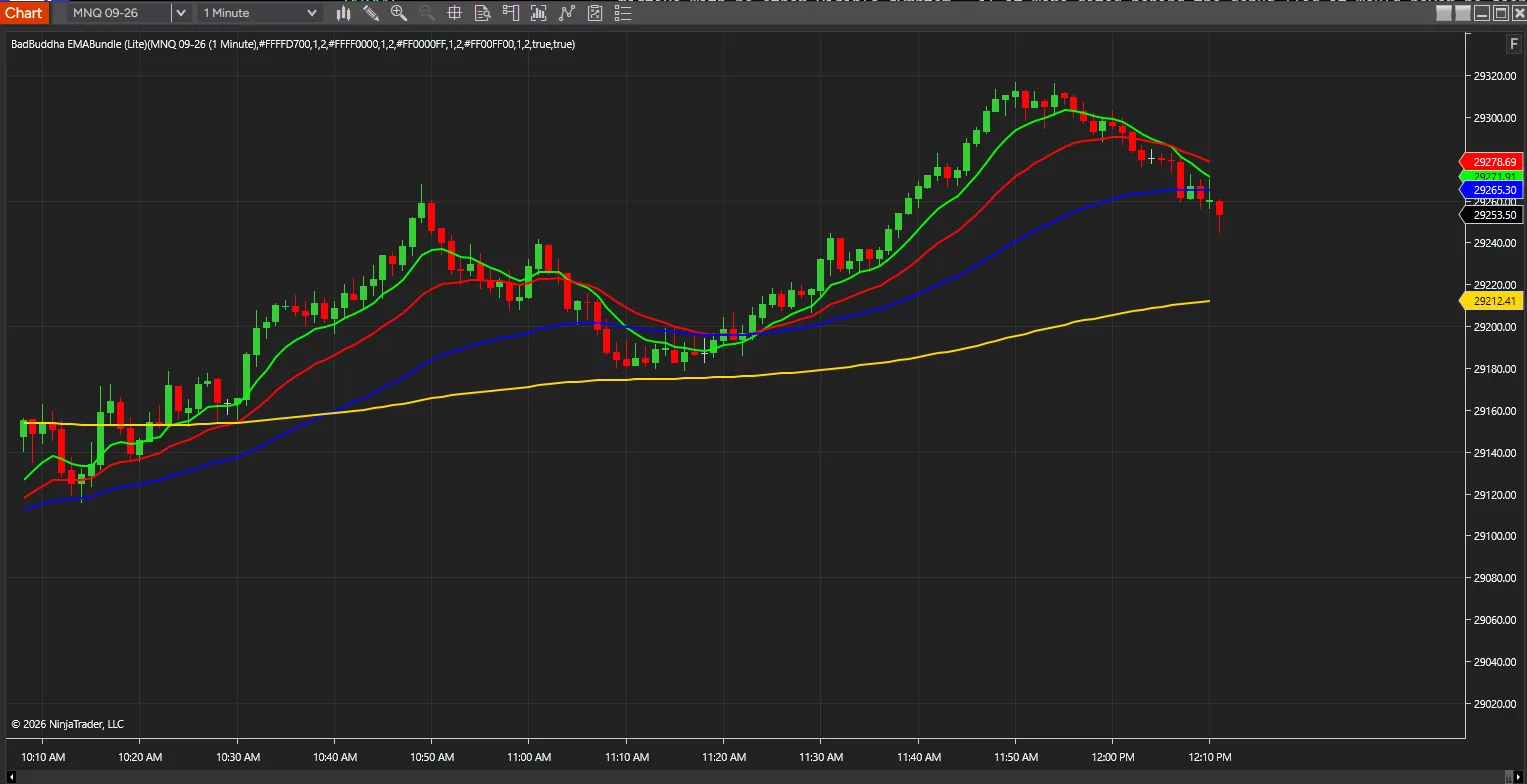
BadBuddha EMA Bundle
FREE
Version 1.2.1.0 · Free tool — no signup required. See the install guide to get it on your chart.
This indicator combines the 9, 20, 50 and 200 EMAs — a core setup favoured by many traders — into a single instrument on your chart. One indicator instead of four means less clutter in the list and one thing to configure.
Four averages, styled independently
Each of the four carries its own colour, line width and opacity, so the fast and slow averages stay distinguishable at a glance rather than blending into one another.
Reading the fan
Stacked in order and spreading apart, the four describe a trend with momentum behind it; compressed and crossing, a market with no particular direction. That shape is the reason to have all four on one chart rather than picking two.
Install in Under a Minute
Same NinjaScript import as every NinjaTrader 8 add-on.
Download the .zip
Hit the download button above — no account or checkout for free tools.
Import into NinjaTrader 8
Control Center → Tools → Import → NinjaScript Add-On, then select the downloaded file. Don’t unzip it first.
Add it to a chart
Open a chart → right-click → Indicators (or the relevant menu) → add BadBuddha EMA Bundle and configure it to taste.
Stay current
BadBuddha tools include an update checker that tells you inside NinjaTrader when a new version ships — and this page always serves the latest build.
BadBuddha EMA Bundle FAQ
Is BadBuddha EMA Bundle really free?
Yes — it's a free BadBuddha tool. No trial clock, no account, no activation; download it and use it.
How do I install BadBuddha EMA Bundle?
Download the .zip, then in NinjaTrader 8 go to Control Center → Tools → Import → NinjaScript Add-On and select the file (don’t unzip it first). Full walkthrough in our Getting Started guide.
Which EMAs does the EMA Bundle include?
The EMA Bundle combines the 9, 20, 50, and 200 EMAs into a single indicator, so you get the common four-EMA setup without loading four separate indicators and cluttering the chart.
Does it work on prop-firm evaluation and funded accounts?
Yes. BadBuddha tools run locally inside your NinjaTrader 8 platform and work the same on sim, evaluation, and funded accounts regardless of broker or prop firm.
How do updates work?
Every BadBuddha tool ships with a built-in update checker — when a new version is released, NinjaTrader lets you know, and the download on this page always serves the current build.
Where do I get support?
Email info@badbuddhacustoms.com with "BadBuddha EMA Bundle" in the subject line. Questions, bug reports, and feature ideas are all welcome.