 Bad
Bad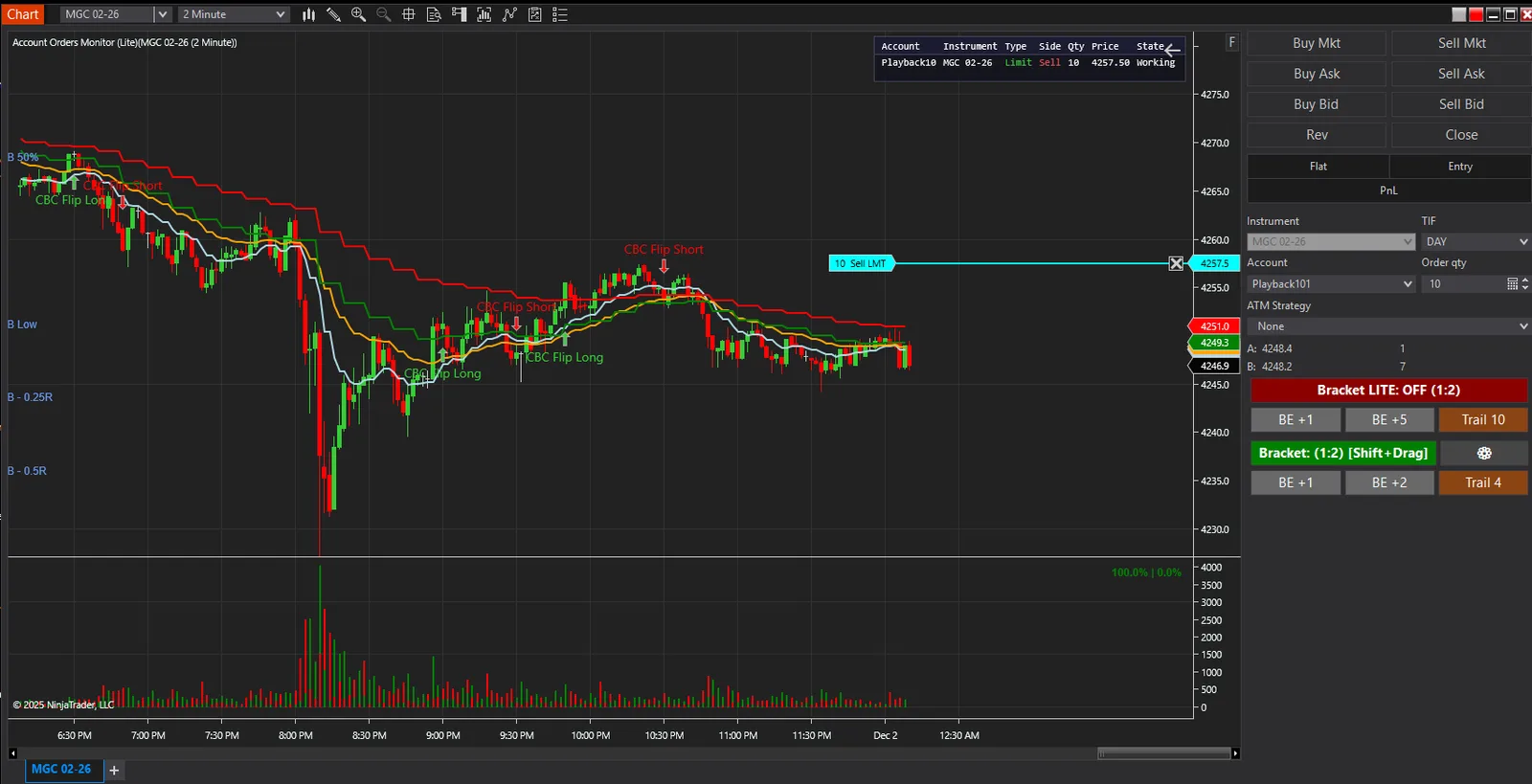
BadBuddha Accounts Order Overview (Lite)
FREE
Version 2.5.0.0 · Free tool — no signup required. See the install guide to get it on your chart.
Account Orders Monitor Lite gives you real-time order tracking across all your NinjaTrader accounts. See working, pending and accepted orders at a glance, in a colour-coded table drawn directly on your chart.
What the table shows
- Account — so orders from several accounts sit side by side
- Instrument — the contract each order belongs to
- Type — Limit or Stop
- Side — Buy, Sell, or BuyToCover
- Qty and Price — size and the level it rests at
- State — Working or Accepted, colour-coded
Why it helps
Orders live in the Control Center, away from the chart you are actually watching. This puts them where your eyes already are, so a resting stop on another account is never a surprise.
Install in Under a Minute
Same NinjaScript import as every NinjaTrader 8 add-on.
Download the .zip
Hit the download button above — no account or checkout for free tools.
Import into NinjaTrader 8
Control Center → Tools → Import → NinjaScript Add-On, then select the downloaded file. Don’t unzip it first.
Add it to a chart
Open a chart → right-click → Indicators (or the relevant menu) → add BadBuddha Accounts Order Overview (Lite) and configure it to taste.
Stay current
BadBuddha tools include an update checker that tells you inside NinjaTrader when a new version ships — and this page always serves the latest build.
BadBuddha Accounts Order Overview (Lite) FAQ
Is BadBuddha Accounts Order Overview (Lite) really free?
Yes — it's a free BadBuddha tool. No trial clock, no account, no activation; download it and use it.
How do I install BadBuddha Accounts Order Overview (Lite)?
Download the .zip, then in NinjaTrader 8 go to Control Center → Tools → Import → NinjaScript Add-On and select the file (don’t unzip it first). Full walkthrough in our Getting Started guide.
What does Accounts Order Overview show?
It tracks orders in real time across all of your NinjaTrader accounts at once, showing working, pending, and accepted orders in color-coded tables drawn directly on the chart — so you can see the state of every account without opening each one.
Does it work on prop-firm evaluation and funded accounts?
Yes. BadBuddha tools run locally inside your NinjaTrader 8 platform and work the same on sim, evaluation, and funded accounts regardless of broker or prop firm.
How do updates work?
Every BadBuddha tool ships with a built-in update checker — when a new version is released, NinjaTrader lets you know, and the download on this page always serves the current build.
Where do I get support?
Email info@badbuddhacustoms.com with "BadBuddha Accounts Order Overview (Lite)" in the subject line. Questions, bug reports, and feature ideas are all welcome.